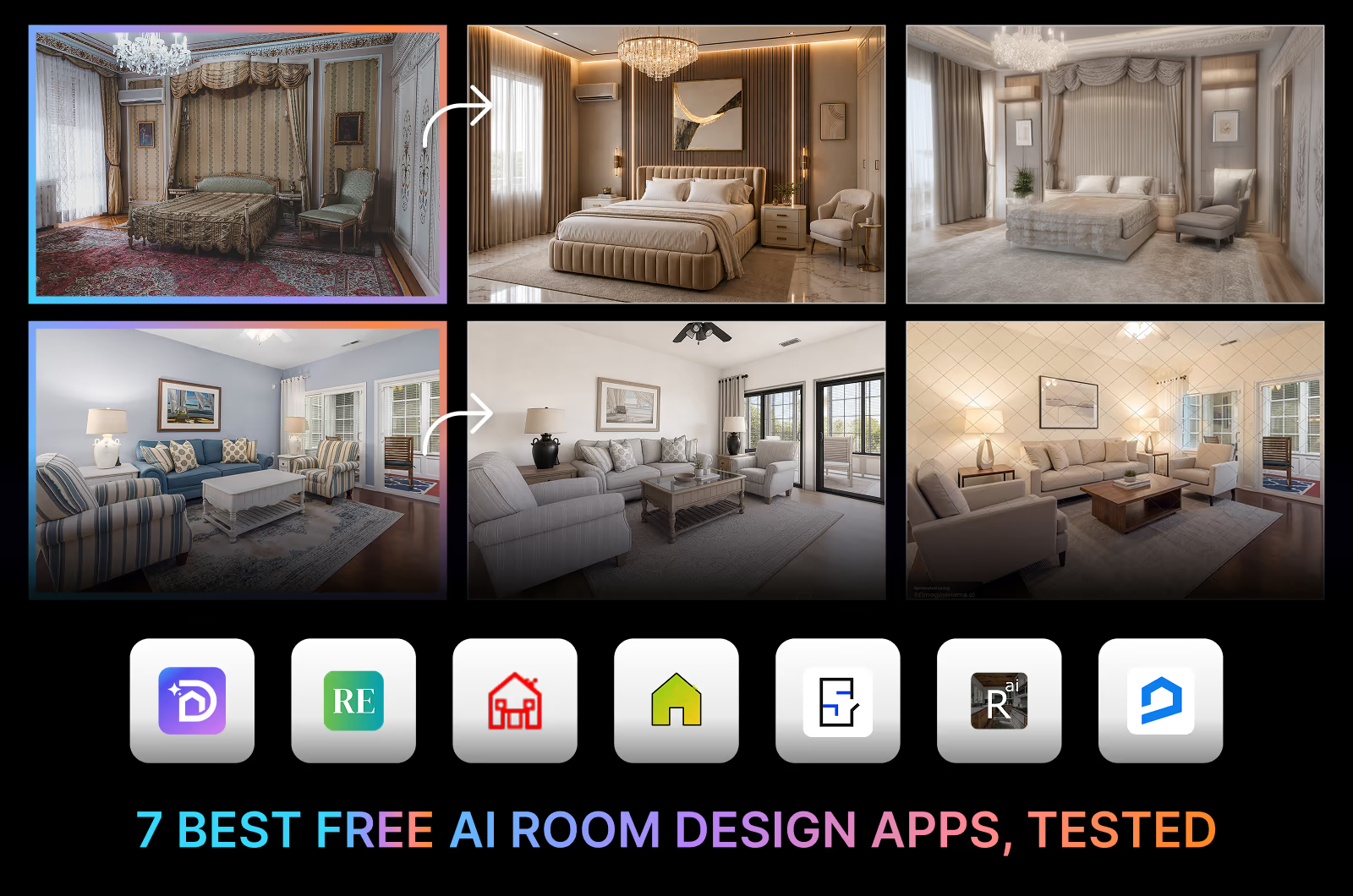
Looking for the best free AI-powered room design app? We tested seven of the most popular options to see what they actually offer without paying.
Some apps offer multiple high-quality room redesigns. Others limit you to a single low-resolution image, add watermarks, or keep the useful features behind a subscription.
This guide compares what each free plan includes, the quality of the results, and which app best suits different needs. All apps were tested using the same room photos, design style, and evaluation criteria to ensure a fair comparison.
DecorAI is the best free AI room design app in our test, scoring 9.2/10. It produced the most realistic redesigns, kept the main room layout, and gave watermark-free results. Dehome came second with the sharpest, highest-resolution renders, but it moved a window and some furniture. ReimagineHome is a good choice for staging real furniture, and Home Design AI offers the widest range of room types. The right app depends on whether you want realistic redesigns, furniture staging, or quick experimentation.
Quick Comparison: Best Free AI Room Design Apps in 2026
Here's a quick comparison of the best free AI room design apps in 2026. This table shows what you actually get for free from each app and where each one falls short.
| App | Best for | What free includes | Biggest limitation |
|---|---|---|---|
| DecorAI | Highest quality, usable redesigns | 3 designs, 20+ tools, 175 styles, no watermark, commercial rights | Card required, and the trial ends after 1 day |
| Dehome | Highly detailed redesigns | 12 credits, 16 room types, 16 styles | Only 2 redesigns from 12 credits, and it shifts the room layout |
| Home Design AI | Widest room type and style coverage | 3 credits, 70 room types, 13 styles | Slow generation, around 1 minute per image |
| ReimagineHome | Staging real, sourceable furniture | 5 designs, no expiration | Heavy watermark on all results |
| Spacely AI | Testing professional-grade tools | 30 credits (3 redesigns), no card required | Logo watermark, slowest generation in our test |
| RemodelAI | Trying a redesign without creating an account | 3 designs, no signup required | Tiled watermark across every result |
| RoomGPT | A quick, low-resolution first look | 1 credit per account, no card required | Blurry, low-detail results |
What "Free" Actually Means for These Apps
Apps that call themselves free do not all mean the same thing by it. We found four different kinds of "free":
- Free trial. A limited number of designs for a given period, then a paid plan starts. Usually gives the highest-quality results, but often requires a payment card.
- Free credits. A small allowance on signup that may or may not refresh. Enough to try the app, but usually not enough to finish a real project.
- Permanent free plan. You can keep using it, with limits on resolution, exports, or styles.
- Free staging. Floor plans and virtual staging using real, sourceable furniture rather than photorealistic AI renders. The aim is to sell you the furniture you just staged.
A homeowner who wants the best-looking result usually needs the free trial. Someone deciding whether a specific sofa fits their room needs free staging. A realtor needs whichever one allows commercial use.
Questions to Ask Before You Choose One
Before choosing a free AI room design app, ask these questions:
- What is the quality of the results?
- Can you use a photo of your own room?
- Does it keep your room's real layout?
- Does it allow access to all the tools and features?
- How many free designs are available, and do they refresh?
- Is the output watermarked?
- Is a card required to start?
- Are you allowed to use the result commercially?
Quality matters most. A usable result does more than look good, it holds up when you take it into a real project. The only way to know which app suits your room is to test it with a real photo, so we did that for you.
We Tested 7 Top Free AI Room Design Apps on the Same Rooms
We performed a hands-on test on 7 top free AI room design apps with a bedroom and a living room photo.
Testing Conditions:
We tested the apps following these conditions:
- Room photos: The same 2 original photos, one bedroom and one living room, for every app
- Interior style: Modern, selected wherever the app offered a style menu
- AI creativity: Default.
- Redesign attempt: One redesign per room. We evaluated the first result without making further edits.
- Testing time: Final week of August 2026
The Original Photos:
We chose a bedroom and a living room because they are the spaces most people use every day. They serve different purposes and present different design challenges. We wanted to see if the apps can handle the redesign challenges of these rooms while keeping the same quality in their free trials.
Bedroom - Original Photo

This bedroom is heavily ornate and traditional, with a canopy bed, crystal chandelier, and richly patterned wallpaper. The red floral rug dominates the floor. A lot is going on visually with the details.
What makes this bedroom hard for the apps:
- Alter the heavy ornamentation and pattern
- Push the traditional room into a modern style
- Add a modern color palette and furniture
- Preserve the room's actual proportions despite the visual clutter
- Keep the window position, wardrobe placement, and bed proportions intact.
Living Room - Original Photo
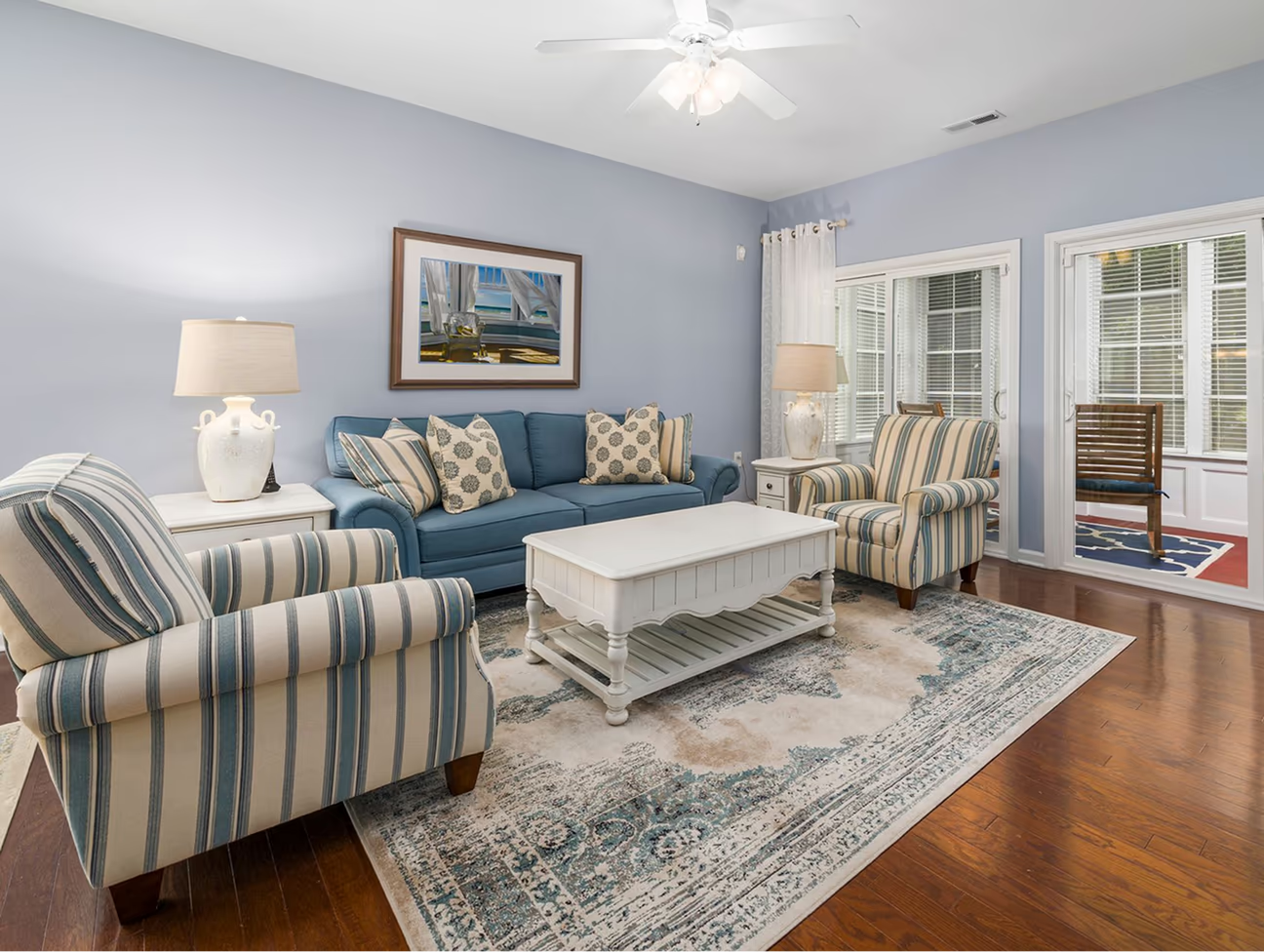
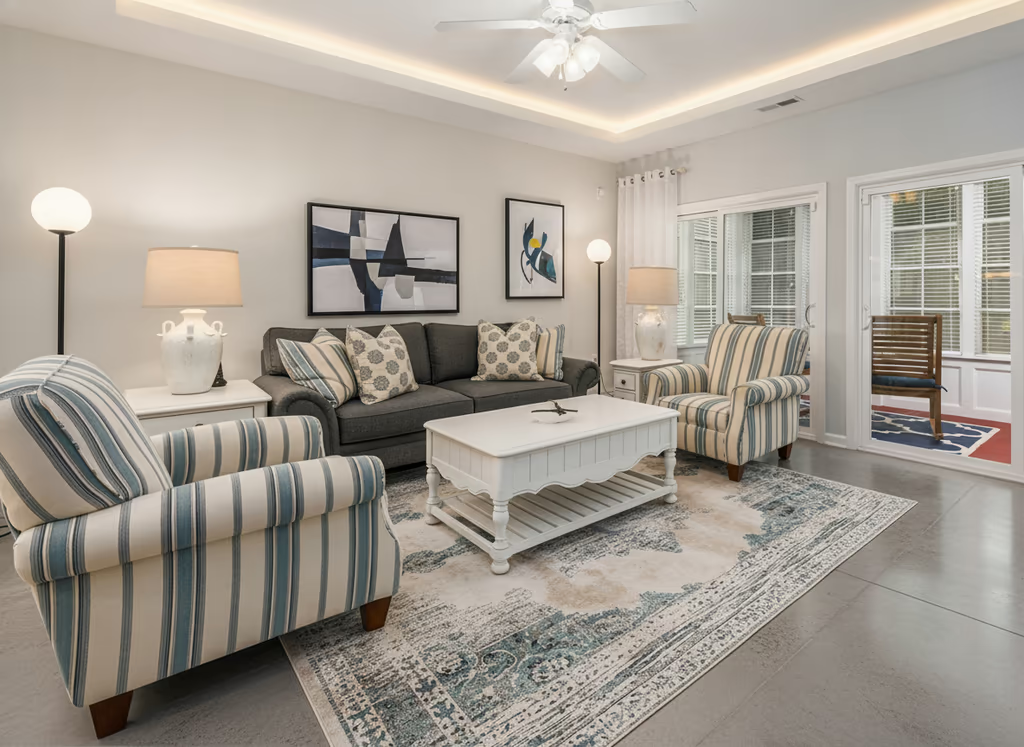
The living room is a simpler starting point, with coastal-style furniture, striped upholstery, and a light blue-gray wall.
What makes this living room hard for the apps:
- Give it an overall modern look
- Manage a full seating arrangement
- Preserve the French doors and windows
- Keep the traffic flow and furniture layout intact rather than congesting the space
- Redesign the surfaces and furniture style without distorting the room.
1. DecorAI: Best Free AI Room Design App
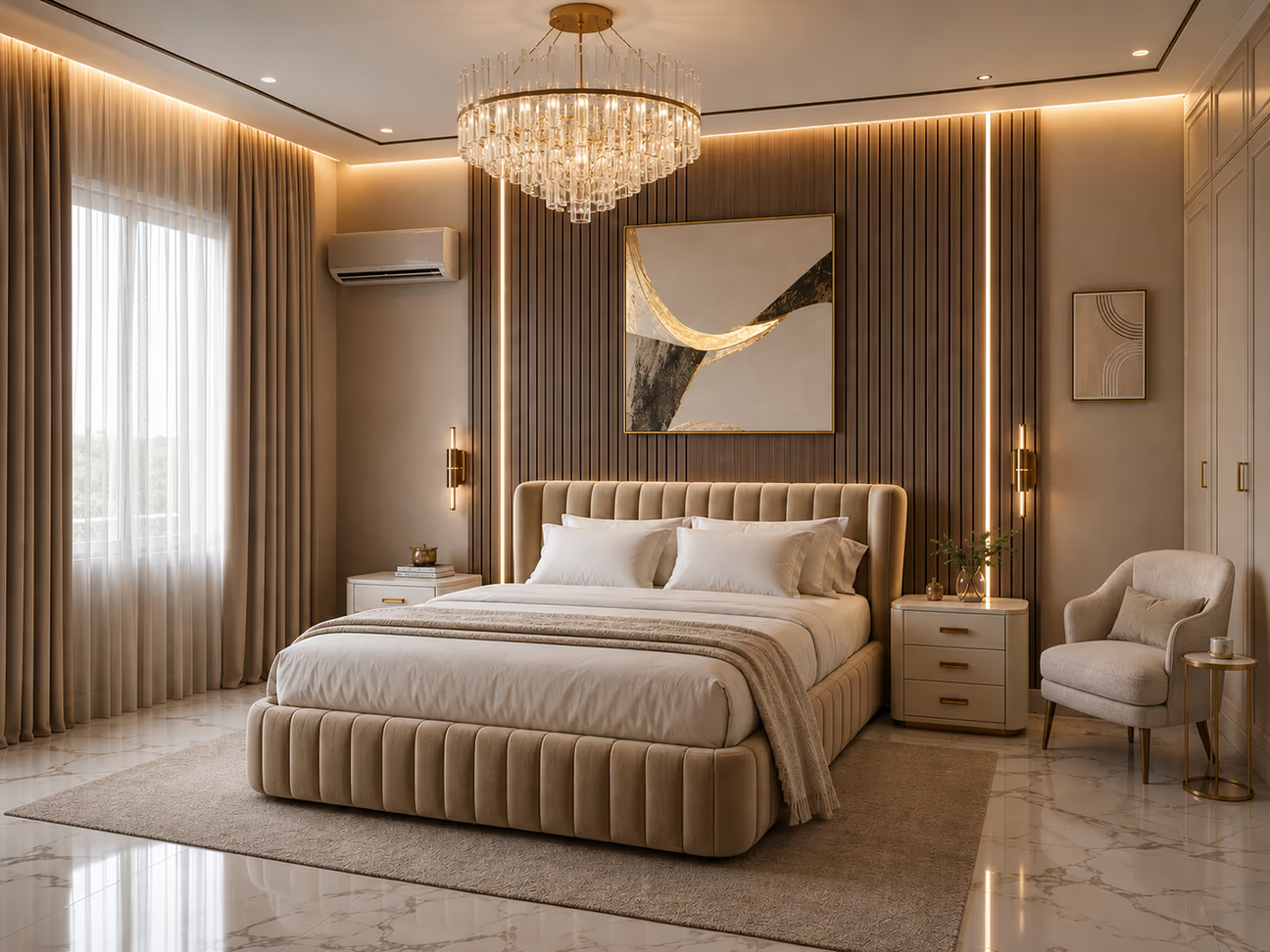
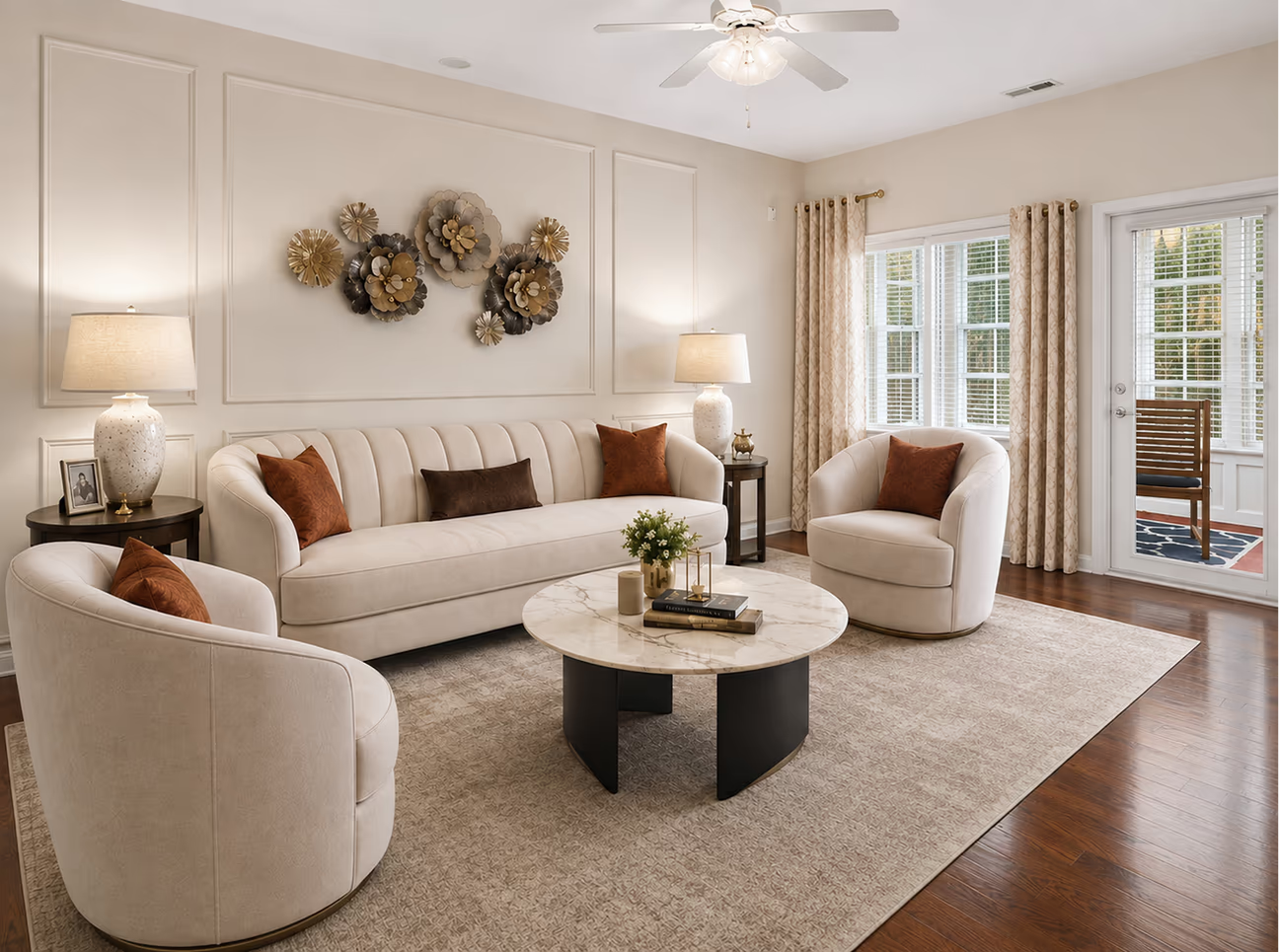
ROOM REDESIGN SCORE: 9.2/10
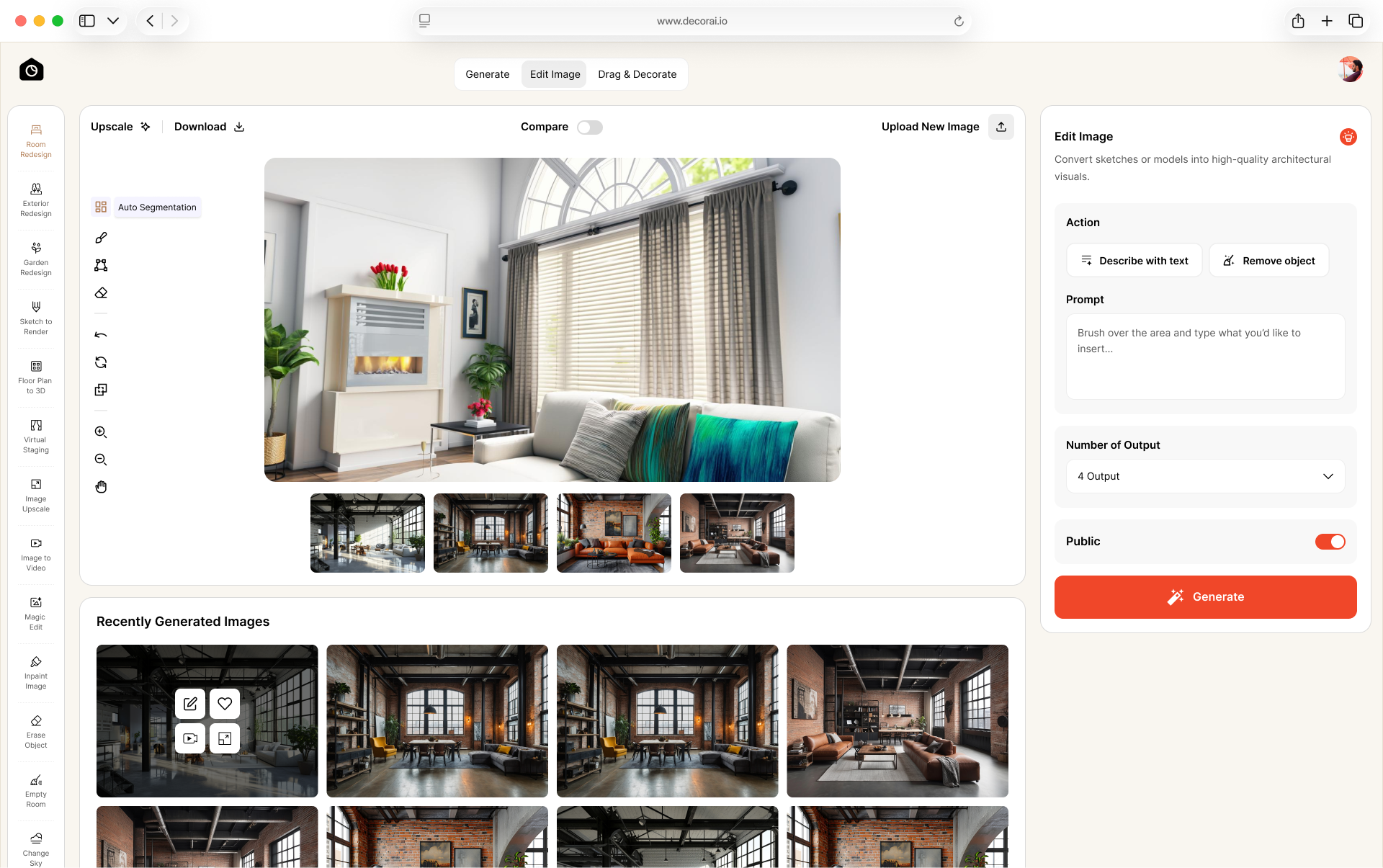
WHY THIS RATING: DecorAI generated highly detailed and photorealistic redesigns for both the bedroom and the living room. In the bedroom it kept the window, air conditioner, bed, armchair and wardrobe in place, and in the living room it kept the ceiling fan, windows and porch door. It replaced the ornate bedroom ceiling, wall panels and parquet floor, which the test asked it to modernize. The combination of furniture, lighting, colors, and finishes produced results that could realistically be used as a design reference. Downloads have no watermark.
FREE TIER TYPE: The trial gives 3 designs with no watermark, full resolution, and commercial usage rights, across 20+ tools and 175 styles covering 129 spaces.
FREE TRIAL EXPERIENCE:
- Sign-up: We used Google login, which took only a few clicks.
- Time to Result: It took about 1 and a half minutes from sign-up to the first result. The bedroom and living room redesign took about 30 seconds for each.
- Access During Test: We had access to all 20+ tools and 175 styles.
- Allowance Used: We used 2 of the 3 free designs quota on the bedroom and living room test. One free design remained after our test.
- Friction or Surprises: From signup to the result, the workflow was smooth.
BEST FOR: Homeowners, renters, and Airbnb hosts who need usable room redesigns.
KNOW BEFORE STARTING: It is a trial, not a permanent free tier. A card is required to start, and the plan renews at $24 a month unless you cancel during the 1-day trial.
2. Dehome: Best Free Option for Detailed Results

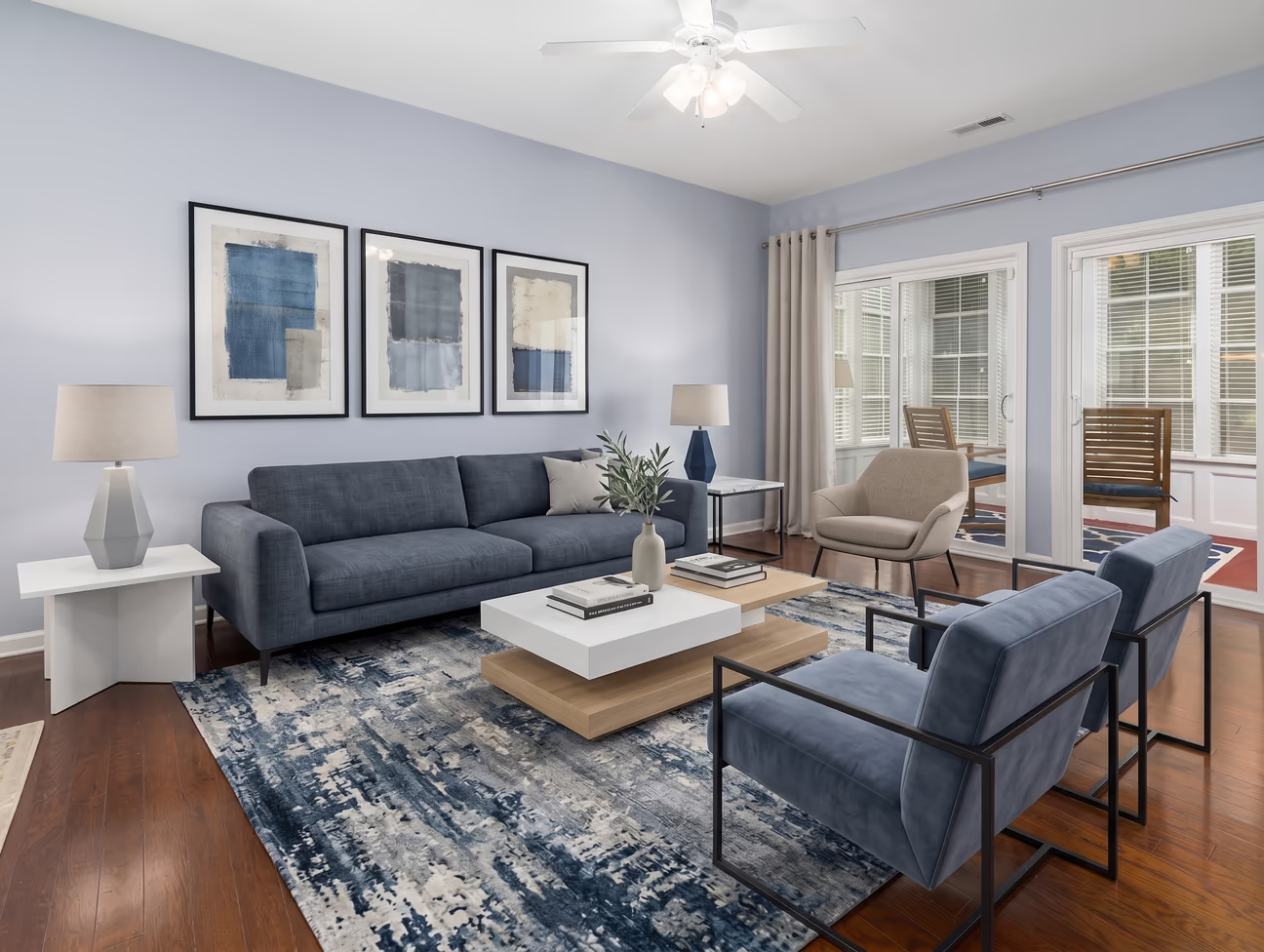
ROOM REDESIGN SCORE: 8.0/10
WHY THIS RATING: Dehome generated highly detailed redesigns for both rooms. It kept the room proportions well. It made the room feel larger through lighter colors and more open furniture placement. The large white wall cabinet complemented the overall look. In the bedroom, however, it moved the window toward the corner and moved the armchair to the other side of the room. The living room kept its room and window layout and picked up a blue color theme, though the armchairs ended up awkwardly placed and block the route to the balcony. Its renders were the sharpest in our test, at the highest resolution.
FREE TIER TYPE: 12 free credits for standard quality design.
FREE TRIAL EXPERIENCE:
- Sign-up: We used Google login, which took only a few clicks.
- Time to Result: Took about 1 minute and 20 seconds from sign-up to the first result.
- Access During Test: The app gives access to 16 room types and 16 design styles.
- Credits Used: Each redesign uses 6 credits, so the 12 free credits covered exactly 2 rooms.
- Friction or Surprises: Both results needed a correction we could not make, because the free credits were gone after two rooms.
BEST FOR: Homeowners and renters who want the most detail in a single render.
KNOW BEFORE STARTING: Free credits allow 2 free redesigns.
3. Home Design AI: Best Free Option for Room Type and Style Variety
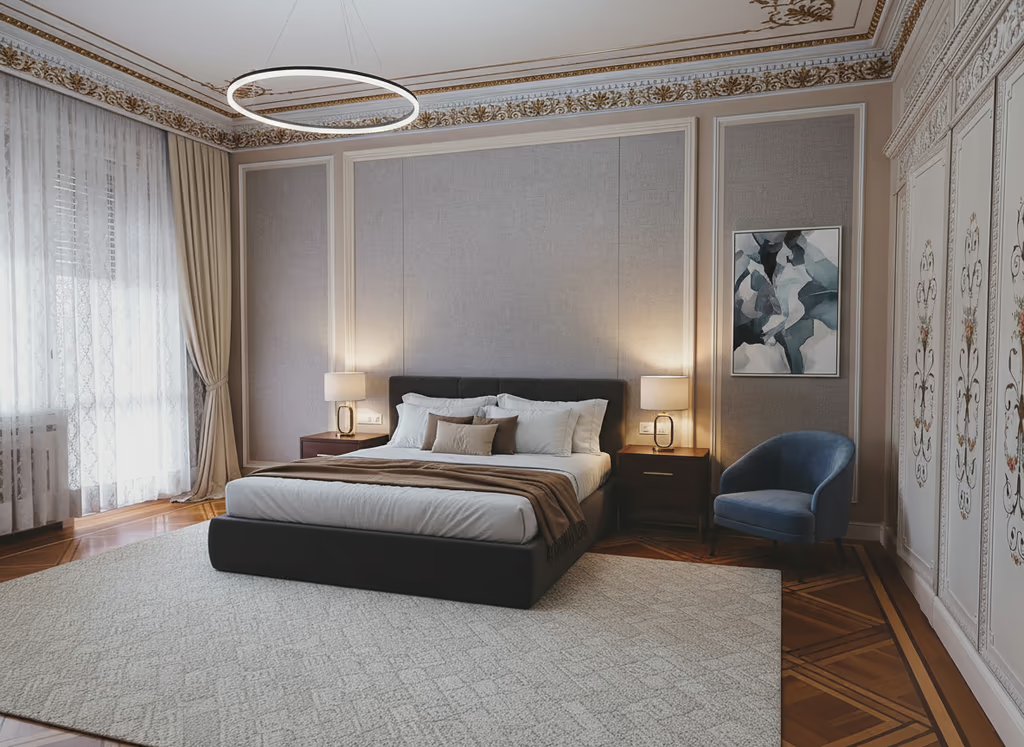
ROOM REDESIGN SCORE: 7.6/10
WHY THIS RATING: Home Design AI maintained the room's original structures. It recolored the walls in both designs. The bedroom got a genuine furniture upgrade, but the air conditioner above the window disappeared. The living room barely changed: the seating materials stayed as they were and only the sectional sofa shifted color. The old floor rug and lampshades were retained. It replaced the original flooring with tile, which felt like a step backward for this room.
FREE TIER TYPE: 3 free credits for standard design
FREE TRIAL EXPERIENCE:
- Sign-up: We used Google login, which took only a few clicks.
- Time to Result: Took about 3 minutes from sign-up to the first result.
- Access During Test: The free trial allows access to 70 room types and 13 design styles.
- Credits Used: 2 of 3 free credits used, and 1 remains.
- Friction or Surprises: Image generation is very slow.
BEST FOR: Homeowners and renters redesigning an unusual room type that other apps do not list.
KNOW BEFORE STARTING: One image generation takes around 1 minute. No credit card required for sign-up.
4. ReimagineHome: Best Free for Real Product Staging
ROOM REDESIGN SCORE: 7.3/10
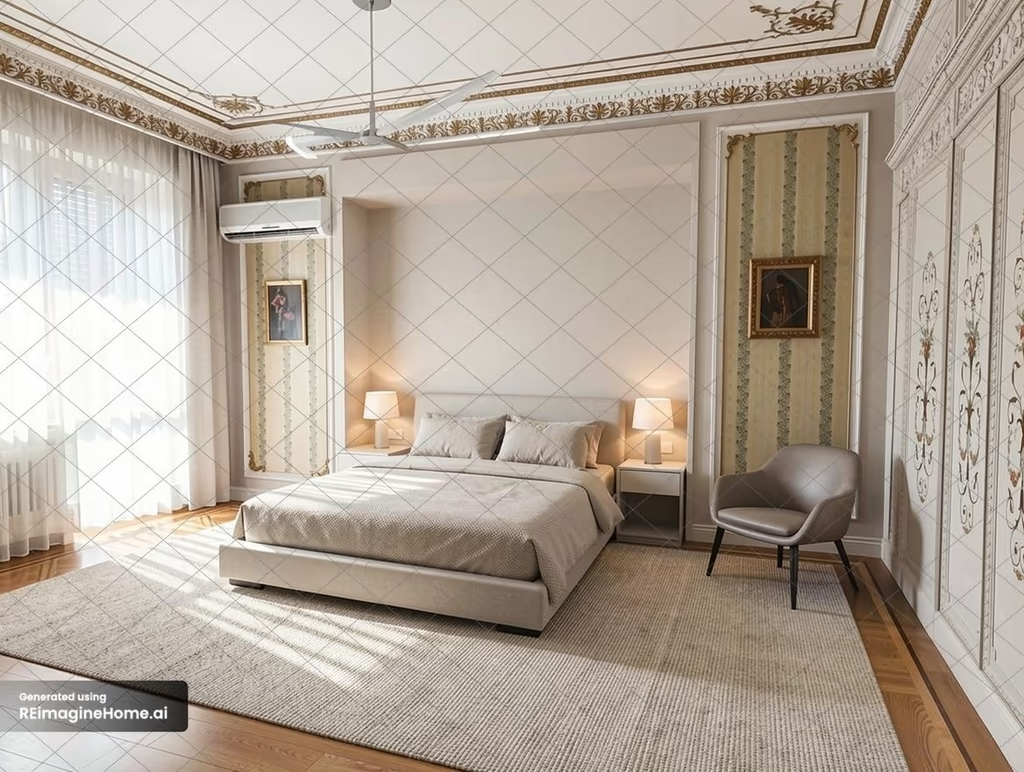
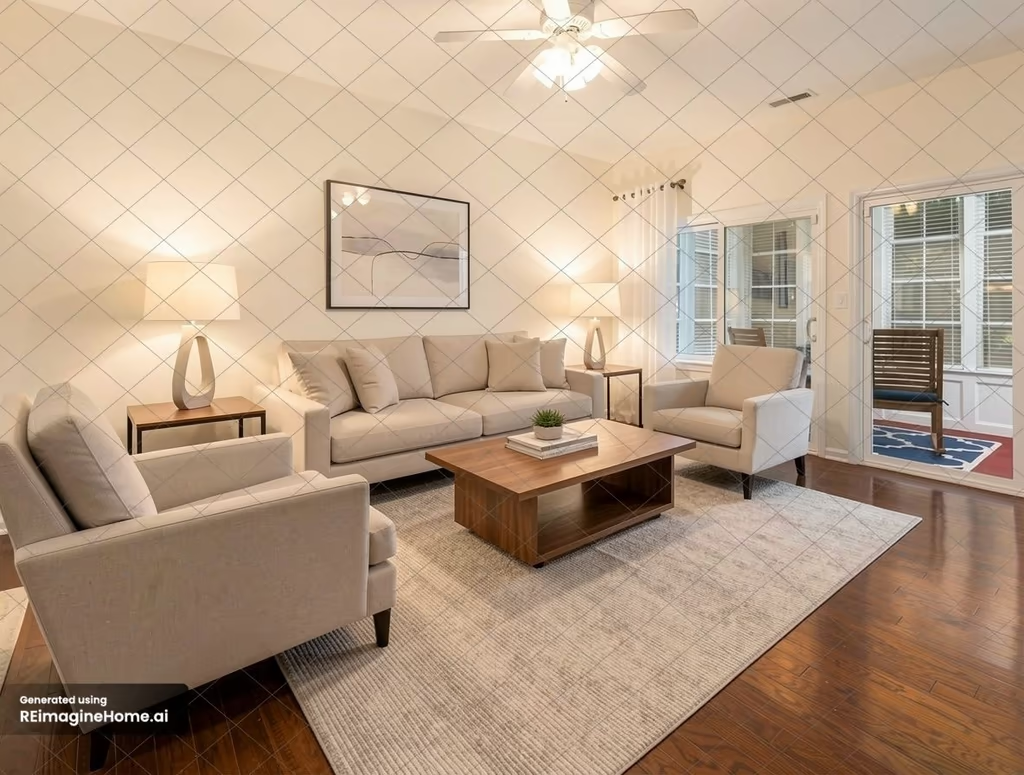
WHY THIS RATING: ReimagineHome AI applied a modern design style in both rooms. It preserved the room layout and dimensions. The app upgraded the bed, seating, rug, and lighting in the bedroom. But it kept the traditional wall decor and wall cabinet style. It performed better in the living room redesign. It improved the wall color, floor rug design, and changed the seating style.
FREE TIER TYPE: 5 free designs with no expiry, at full resolution but heavily watermarked.
FREE TRIAL EXPERIENCE:
- Sign-up: We used Google login, which took only a few clicks.
- Time to Result: Took about 2 minutes from sign-up to the first result.
- Access During Test: The free version has no room type or style selector, only a prompt box, so we asked it to transform each room in a modern style.
- Credits Used: 2 of 5 free designs used. 3 free designs left.
- Friction or Surprises: No guided controls.
BEST FOR: Homeowners and renters staging real furniture in a room they already have.
KNOW BEFORE STARTING: Heavily watermarked results. No card is required during sign-up.
5. Spacely AI: Best Free Credits for Professionals
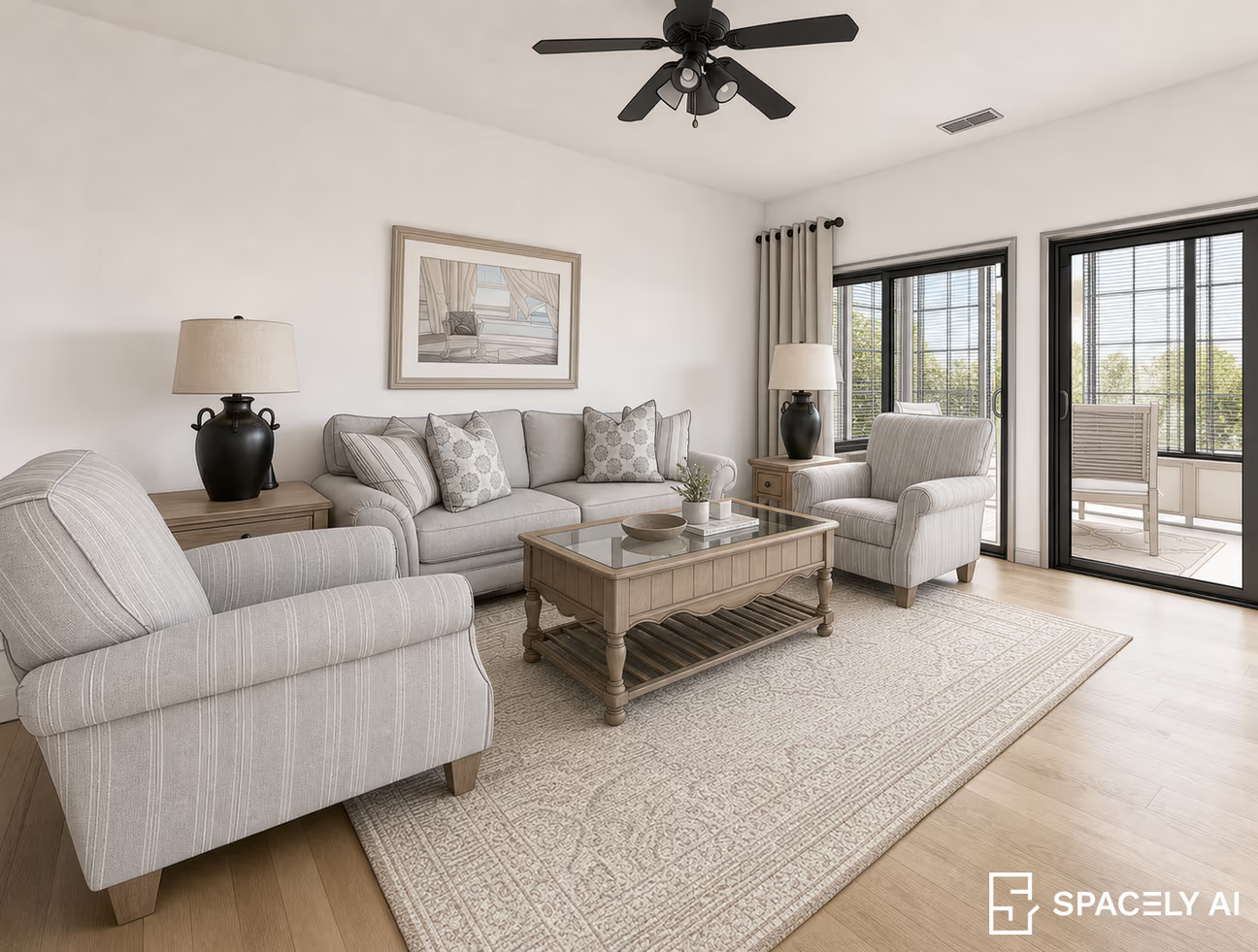
ROOM REDESIGN SCORE: 6.8/10
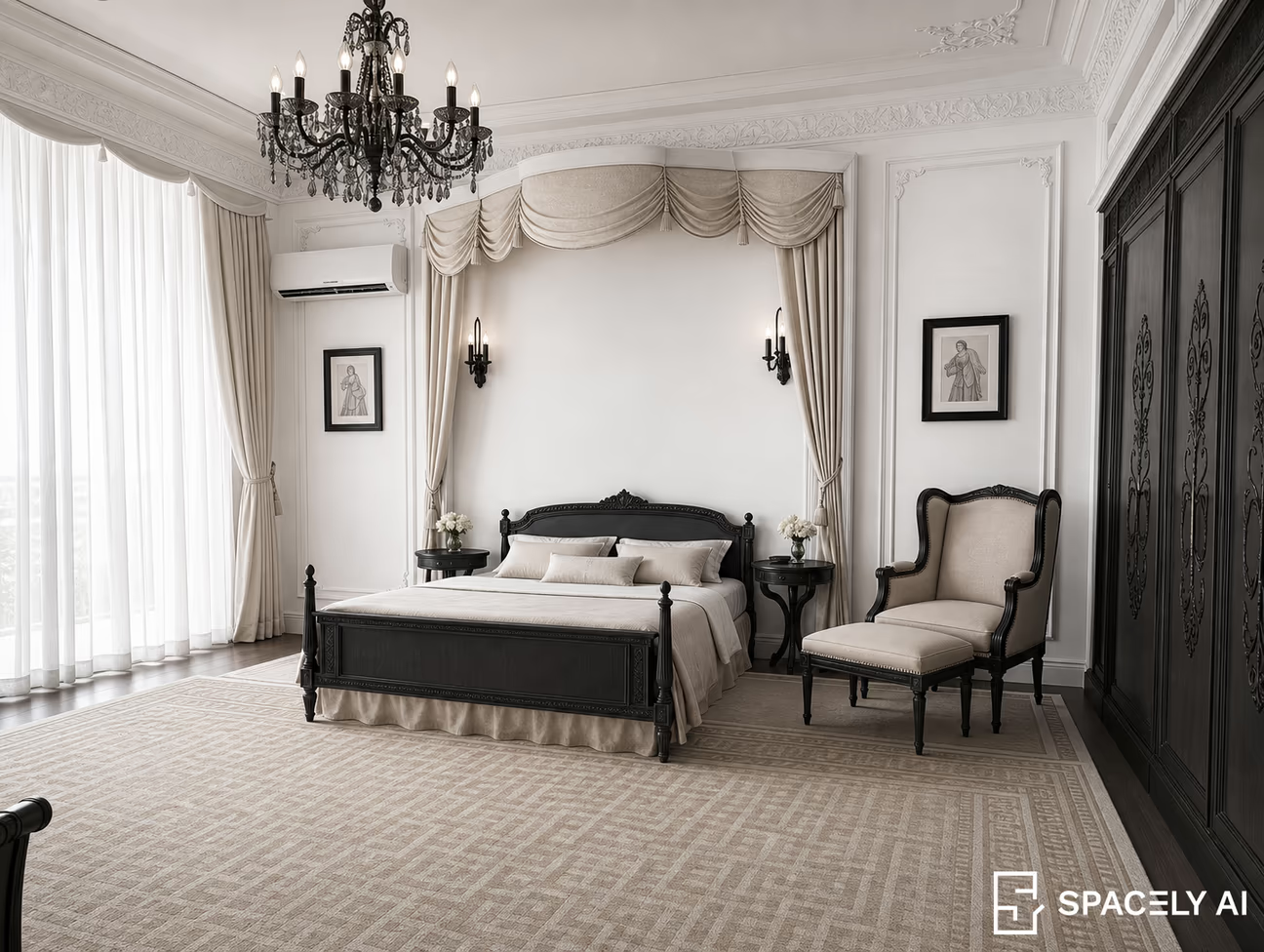
WHY THIS RATING: The generated rooms did not fully match the requested modern style. The bedroom is still in a traditional style. Spacely AI used different materials and colors for furniture and surfaces, but the decor style didn't improve. The bedroom layout was preserved well. In the living room, it replaced the white window frames with black sliding doors and changed the balcony area.
FREE TIER TYPE: 30 free credits. 10 credits per redesign.
FREE TRIAL EXPERIENCE:
- Sign-up: We used Google login, which took only a few clicks.
- Time to Result: Took about 3 minutes from sign-up to the first result. Redesigns took about 1 minute and 40 seconds each.
- Access During Test: No room type or style selector, only a prompt box, so we asked it to transform each room in a modern style.
- Credits Used: 20 of 30 free credits consumed for 2 redesigns.
- Friction or Surprises: Redesign took the longest time among all the tested apps.
BEST FOR: Designers trying a professional toolset before paying for it.
KNOW BEFORE STARTING: A Spacely AI logo watermark sits in the corner of every result. No card is required during sign-up.
6. RemodelAI: Best Free App to Try Without Signing Up
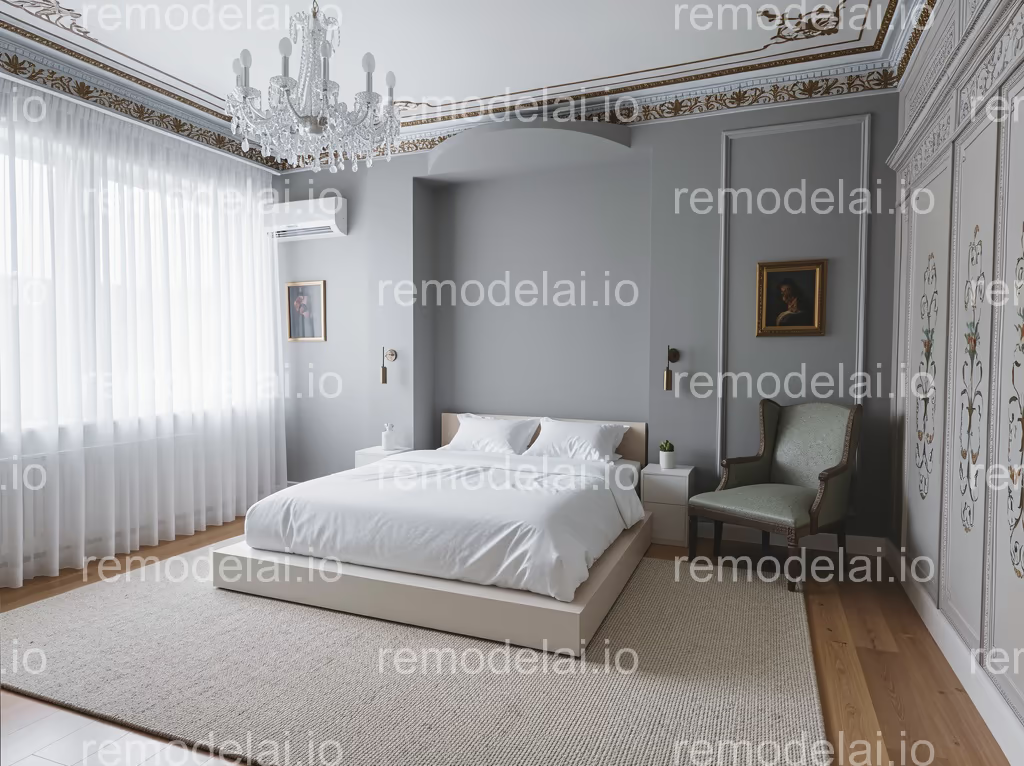
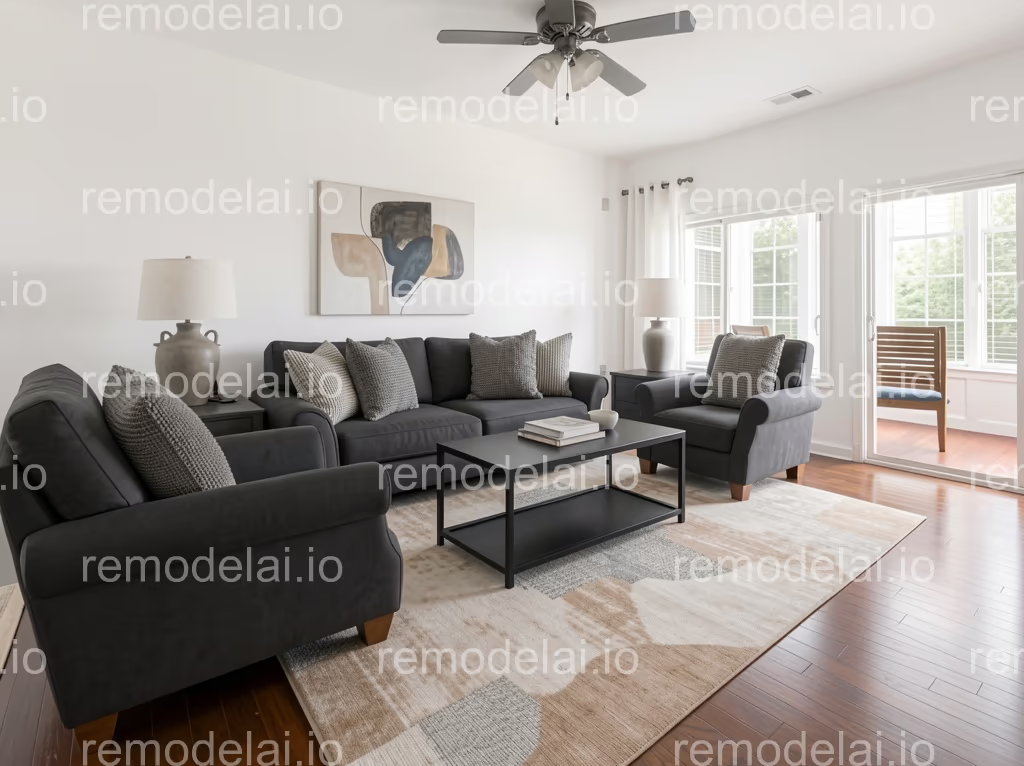
ROOM REDESIGN SCORE: 6.6/10
WHY THIS RATING: RemodelAI preserved the wall layout and dimensions. It recolored the walls consistently. However, the generated decor doesn't match any modern interior style. In the redesigned bedroom, it kept most of the original wall decor and the wall cabinet style. The redesigned living room has strong color contrast and good details. The app changed the sofa material and upgraded the coffee table and floor rug. The app removed the rug on the balcony floor.
FREE TIER TYPE: 3 free designs with watermarks.
FREE TRIAL EXPERIENCE:
- Sign-up: No sign-up required.
- Time to Result: About 2 minutes from opening the app to the first result. Each redesign took about 30 seconds.
- Access During Test: 9 room types and 2 styles were accessible in the free trial.
- Credits Used: 2 of the 3 free designs used.
- Friction or Surprises: Every result carries a remodelai.io watermark tiled across the whole image.
BEST FOR: Anyone who wants to try a redesign before creating an account.
KNOW BEFORE STARTING: Tiled watermark on every result. RemodelAI runs on the web, iOS and Android.
7. RoomGPT: Best for a Quick, Low-resolution First Look
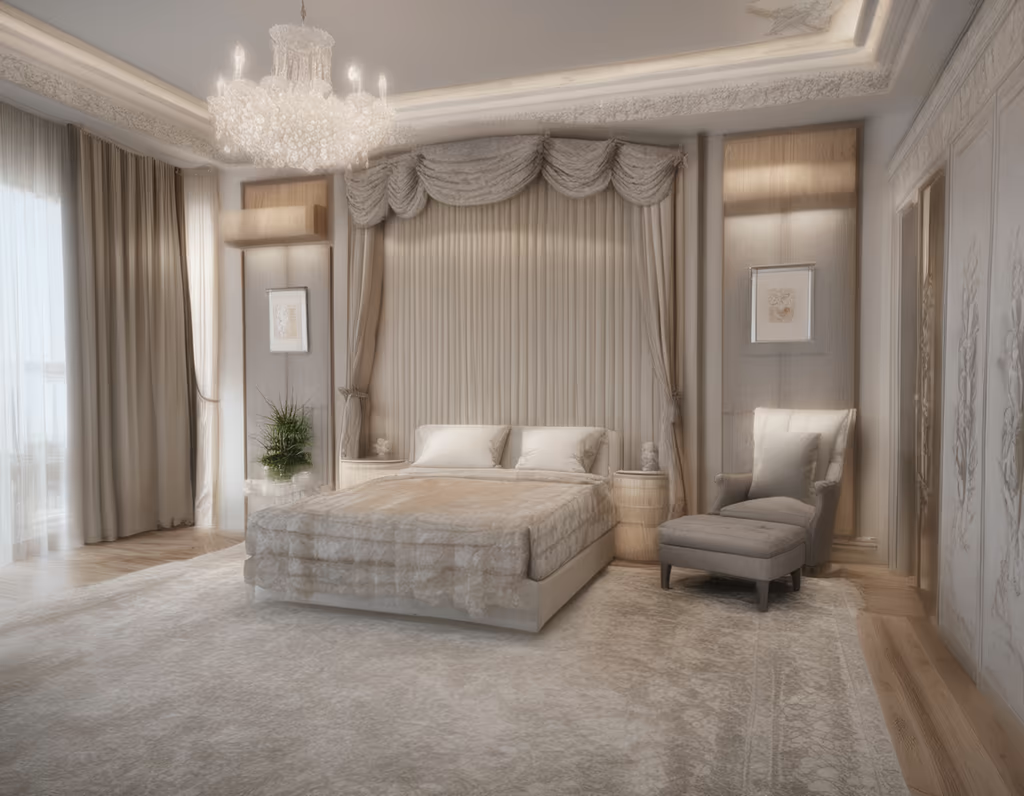
ROOM REDESIGN SCORE: 5.5/10
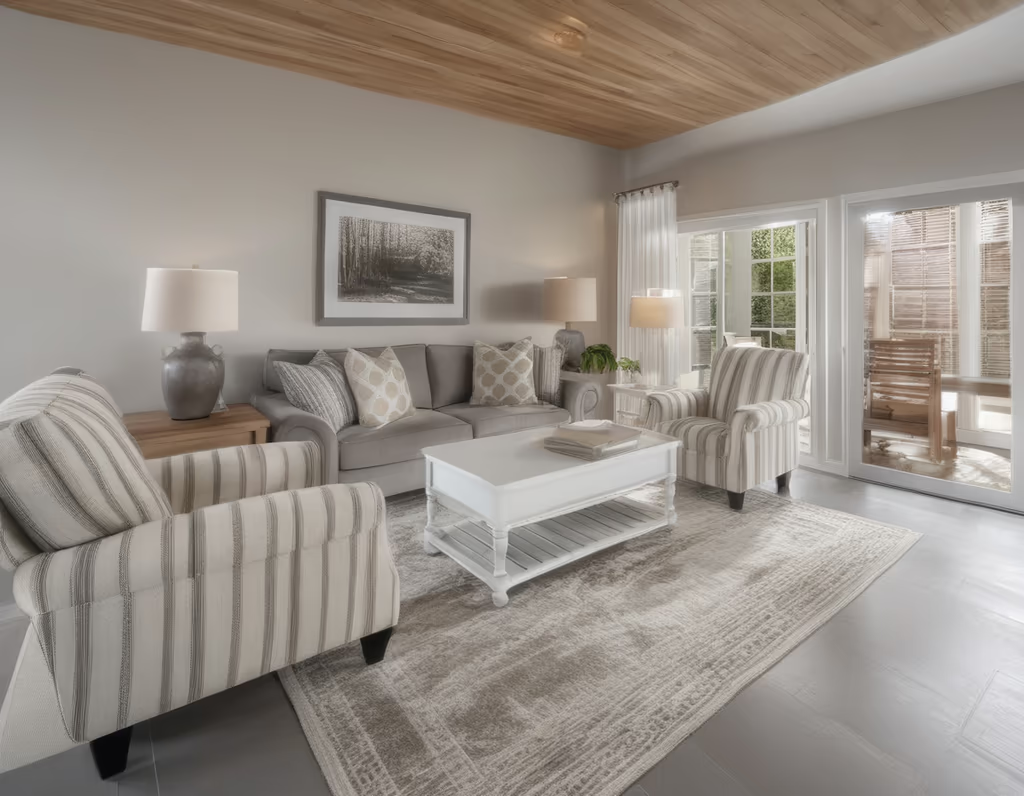
WHY THIS RATING: RoomGPT generated very basic, blurry results for both rooms. The results lack realism and detail. It kept the room dimensions, but it replaced the living room ceiling with wood planks and removed the ceiling fan. Image generation took about 15 seconds.
FREE TIER TYPE: 1 credit for a basic design with no watermark. RoomGPT gives access to all its room types and themes during the trial.
FREE TRIAL EXPERIENCE:
- Sign-up: We used Google login, which took only a few clicks.
- Time to Result: About 1 and a half minutes from sign-up to the first result, of which the image generation itself took roughly 15 seconds.
- Access During Test: We had access to 9 room types and 9 themes.
- Credits Used: 1 credit per account, so we needed 2 accounts to redesign both rooms.
- Friction or Surprises: We had to create multiple accounts for 2 redesigns.
BEST FOR: Casual users who only want a quick preview rather than a usable redesign.
KNOW BEFORE STARTING: Only 1 free credit for 1 basic room redesign.
Which Free AI Room Design App Should You Use?
| If you want to | Best choice |
|---|---|
| The highest quality, most usable redesigns | DecorAI |
| Detailed and high-contrast redesigns | Dehome |
| The widest choice of room types and styles | Home Design AI |
| Real product staging in your own room | ReimagineHome |
| To explore professional-grade tools for free | Spacely AI |
| Try a redesign without creating an account | RemodelAI |
| Just a quick, low-stakes first look | RoomGPT |
How to Get Better Results From Any AI Room Design App
Every AI room design app performs better with a good source photo. Here's how you can get the best out of any AI room design app:
Turn the lights on
Make sure the room is well-lit. AI room design tools generate better results with clear photos.
Clear the clutter
Try to keep the room clean. Clear any stray cables, appliances, and debris. The cleaner the source photo, the easier it is to judge what changed.
Take your room photo from the doorway
While taking a photo, stand in the doorway or a corner. This position gives the best chance to capture the full view of the room with the walls, floor, windows, and the main furniture.
Write a clear prompt if there's no style selector
Not every app gives you a full style menu, especially for a free trial. If a prompt is a must, write it clearly by mentioning the specific changes you want.
If an app only takes a text prompt instead of a style menu, describe the materials, colors, furniture features, and placements. Don't just use the word "modern." Vague prompts will generate the least consistent results, with invented features.
Compare the redesigned image with the original
Put the before-and-after photos next to each other. This is the easiest way to spot layout changes, missing windows, or furniture that moved.
Are Free AI Room Design Apps Actually Useful?
Yes, free AI room design tools are useful for the right job. They are good for testing style directions and comparing colors and furniture choices. Our test across 7 of the best AI room design apps showed how free trials are actually useful. DecorAI produced the most usable results in our test. It preserved both room layouts and generated full-quality, watermark-free redesigns, useful for a homeowner or an Airbnb host who wants a clear design direction. ReimagineHome takes a more practical route by staging real, sourceable furniture instead of just changing the style, good for anyone checking if a specific piece would work before buying it. Home Design AI stood out for its range, with free access to 70 room types and 13 styles. None of these apps replace a measured floor plan or a real site visit, but they can help you start a renovation plan with a few clicks.
If you're planning to update the outdoor space of your home too, read this comparison of the best AI landscape design apps that covers the same kind of free-tier testing for front yards, backyards, and gardens.
How Far Free Actually Gets You
Free tiers exist to answer one question: is the app worth paying for?
The real limit is rarely image quality; it's how little room you get to iterate. Testing just two rooms used up all 12 of Dehome's free credits and 20 of Spacely AI's 30. DecorAI, Home Design AI and RemodelAI each had a single design left after one bedroom and one living room. RoomGPT only gives one credit per account. None of that leaves space for the parts that actually matter: keeping a layout you liked, swapping the cabinet color, trying a different floor, and comparing versions side by side. Only ReimagineHome had room to spare, with 3 of 5 designs left and no expiry, and every one of those carries a heavy watermark. The rest reached their free limit just as real experimentation began.
If you're redesigning one room, just once, then a free option may genuinely be enough. If you're planning real work, or more than one room, the numbers above show how fast that runs out.
Frequently asked questions
DecorAI is our top choice for free, high-quality AI room redesigns in this test. It generated detailed, photorealistic results, preserved the room layout well, and provided high-quality images without watermarks throughout the test. Planner 5D and other tools might be better if you want to plan and arrange a room manually.
Yes, but most free AI-powered interior design apps have limitations. Some offer free credits, while others provide a limited trial or lower-quality results. In our test, DecorAI offered 3 free designs during its 1-day trial, while ReimagineHome, Home Design AI, Dehome, Spacely AI, RemodelAI, and RoomGPT used different free credit or trial models.
Yes. Several AI-powered room design apps allow you to upload a photo of your current room and generate a redesigned version. DecorAI, ReimagineHome, Home Design AI, Dehome, Spacely AI, RemodelAI, and RoomGPT all support room redesign from photos, though the quality, price, and available features vary.
Start by taking a clear photo of your room and uploading it to an AI-powered room design app. Choose a room type and design style if the app offers those options. If it supports text prompts, describe the changes you want, such as new furniture, colors, flooring, lighting, or decor. Generate the design and compare it to the original room before deciding which ideas you want to use.
Yes. Many AI-powered room design apps offer free credits or trials that let you create at least a few designs without paying. However, free access may have limitations, such as watermarks, fewer designs, lower resolution, limited styles, or an expiration date. Check the free plan before uploading your photos.
The best option depends on whether you prefer to design the room yourself or have AI redesign it. For manual planning, tools like Planner 5D are useful, as they allow you to create and arrange spaces to your liking. If you want to upload a photo and quickly see how the room would look, an AI-powered design tool like DecorAI is more suitable.
It depends on the app's terms. Some free trial versions allow personal use but may restrict commercial use, while others add watermarks or limit downloads. The DecorAI trial includes 3 designs without watermarks, with commercial use rights. Always check the app's terms before using an image from the free trial for commercial purposes.
Some programs do this better than others. In our tests, DecorAI, ReimagineHome, Home Design AI and RemodelAI kept the main structure of both rooms, although some individual elements changed. Dehome moved a bedroom window, and Spacely AI replaced the living room windows. AI-generated designs are visual concepts, not construction plans with exact measurements, so important dimensions, doors, windows, and other existing features should always be checked against the original room.
The Short Version
Start with DecorAI if you want a realistic redesign of your own room at a quality you can actually use. If you want to stage real furniture in your own room rather than just restyle it, ReimagineHome is built for that. If you're weighing whether to pay for a professional tool, Spacely AI's free credits give you a real look at it before you commit.
If you want the broader picture, our comparison of the best AI interior design apps covers more apps across both free and paid tiers.
Start with one room, compare two or three design directions, then keep the one that feels right. Free is a way to find out whether this is for you. It is not a way to finish a room.
See Your Room Redesigned in Seconds
Upload one photo and compare styles, furniture and finishes on your actual room rather than a stock render.