AI bathroom design apps help you see how your bathroom could look before making changes. Upload a photo and choose a style to try new colors, cabinets and fixtures. We compared six apps using the same bathroom photo to see how well they kept the toilet, sink and shower in place and how real the results looked. We also asked ChatGPT to redesign the room as a separate example.
DecorAI scored 7/8, tying with Genroom and Paintit.ai. Its result kept the toilet, sink and shower in similar places, but moved the sink faucet to the wall. REimagineHome offers real furniture and decoration suggestions. For a new layout based on room measurements, use a planner such as Planner 5D.
Disclosure: DecorAI is our product. We reviewed its result using the same checks as the other apps and explain its limits below.
Quick Comparison
| App | Kept the main layout? | Score /8 | Free access |
|---|---|---|---|
| DecorAI | Mostly. The sink, toilet and shower stayed in similar places, but the faucet moved to the wall. | 7/8 | 3 designs in a one-day trial; card required; no watermark. |
| Genroom | Mostly. The main fixtures stayed in similar places, but the wall vent disappeared. | 7/8 | 6 free credits after sign-in, enough for 3 designs. |
| Paintit.ai | Mostly. The main fixtures, window and wall vent stayed in similar places. | 7/8 | 30 free credits; at least 3 credits per image; 1K output. |
| REimagineHome | Mostly. The main fixtures, window and wall vent stayed in similar places. | 6.5/8 | 5 free designs; no card required; the result we got had a watermark. |
| Home Design AI | Partly. The toilet and shower stayed in similar places, but the sink position changed slightly. | 6.5/8 | Free credits after login; the number is not stated, and credits never expire. |
| RoomGPT | Partly. The sink and shower stayed in similar areas, but the toilet and wall vent details changed. | 5/8 | 1 free design after Google sign-in. |
How We Compared the Results
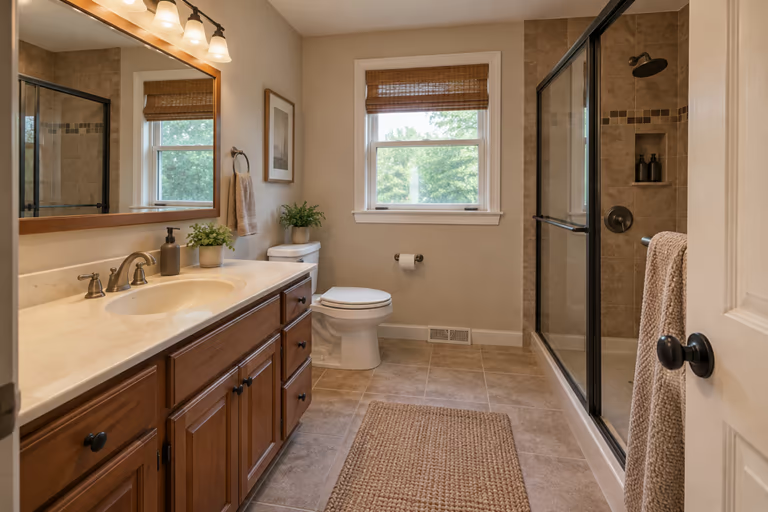
We tested six AI bathroom design apps using the same original bathroom photo on October 19, 2026. We checked how well each app kept the main bathroom layout and how realistic its finished image looked.
Each app received a score out of eight, with up to four points for each of these two criteria:
- Room Layout: We checked whether the sink, toilet, shower and window stayed in their original positions. We also checked whether smaller details, such as the wall vent, were preserved.
- Image Quality: We checked how clear and realistic the tiles, mirrors and fixtures looked. Blurry details, bent edges and unusual shapes lowered the score.
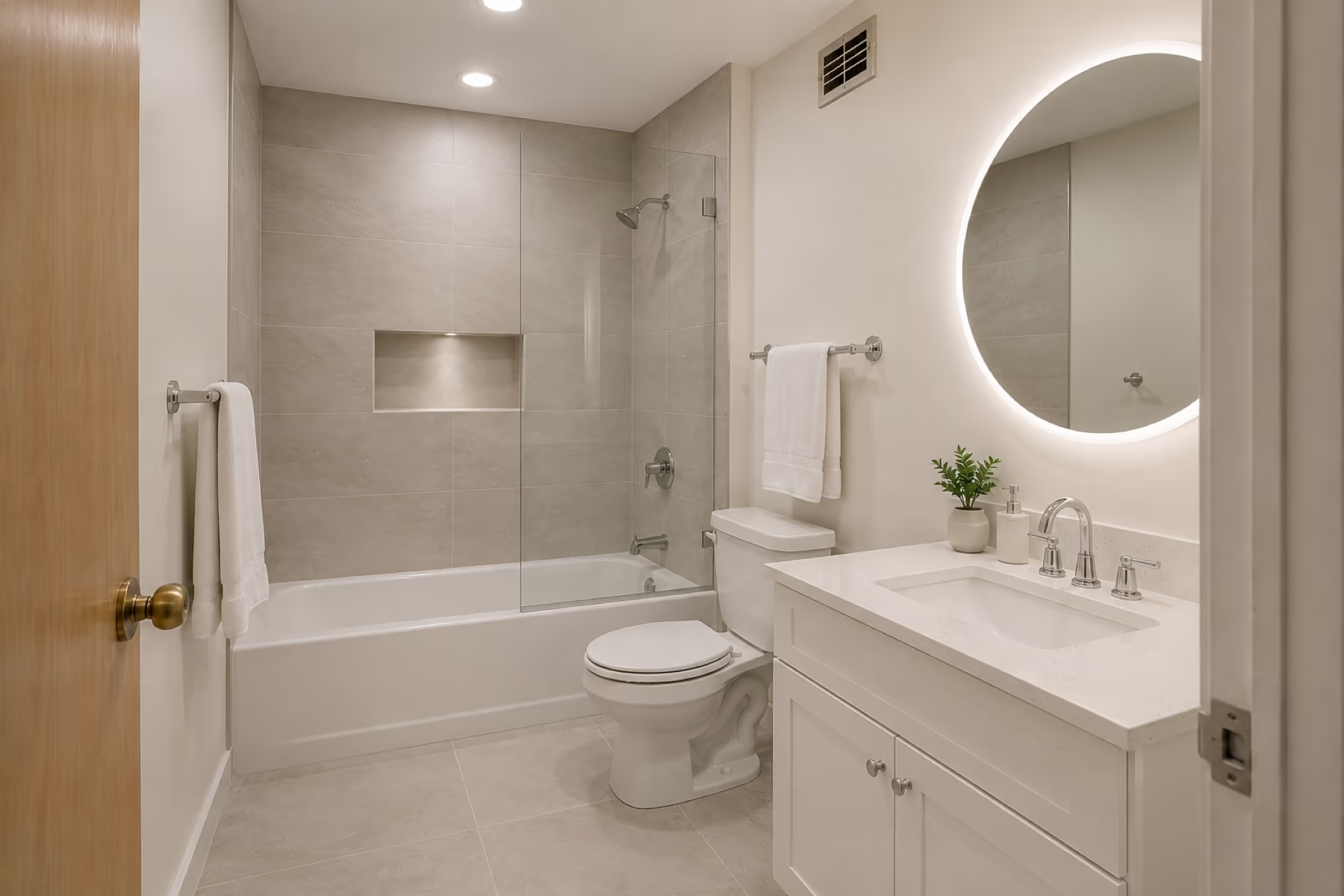
Half points were used to reflect smaller flaws in the results. We used the original bathroom photo below to compare each app's results and see how closely they matched the starting room.
Why the Bathroom Layout Matters
Moving a toilet or shower can mean opening the floor and changing pipes. This adds work and may increase the cost. Even a new sink cabinet may need pipe changes if the sink or faucets are different.
Compare each design with your original photo before choosing a new look. Keeping the main items in place may help control costs. Our bathroom remodel cost guide explains what different budgets may cover.
1. DecorAI
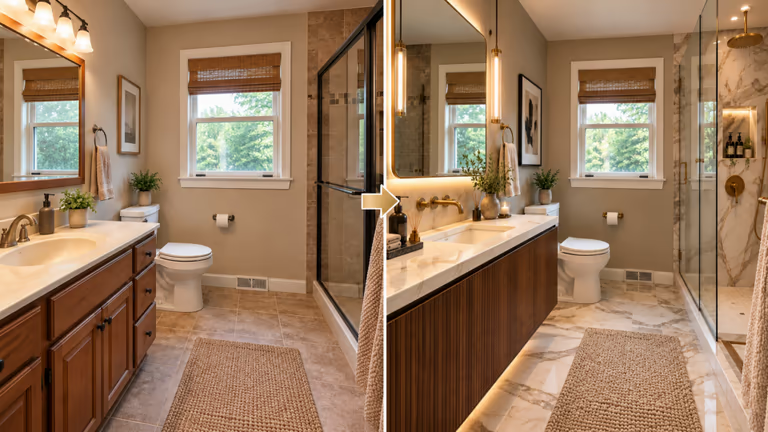
DecorAI lets you redesign a bathroom using a photo of your existing space. Choose from 6 bathroom types, such as a half bath or wet room, and 7 styles, including Spa Minimalist and Japanese Zen. You can also choose a tile style and decide whether to change the whole room, only the surfaces, or only the fixtures.
Score: 7/8
Kept the plumbing: The main items stayed in place, but the faucet moved to the wall. Some pipes may need changing.
Free access: A free 1-day trial includes 3 designs and no watermark. A card is required, and the monthly plan costs $24. See [DecorAI pricing] for more details.
Best for: Trying bathroom ideas on a photo of your own room before choosing what to buy.
Where it falls short: The designs do not include exact measurements. Check sizes and any pipe changes before starting work. The trial requires a card.
2. Genroom
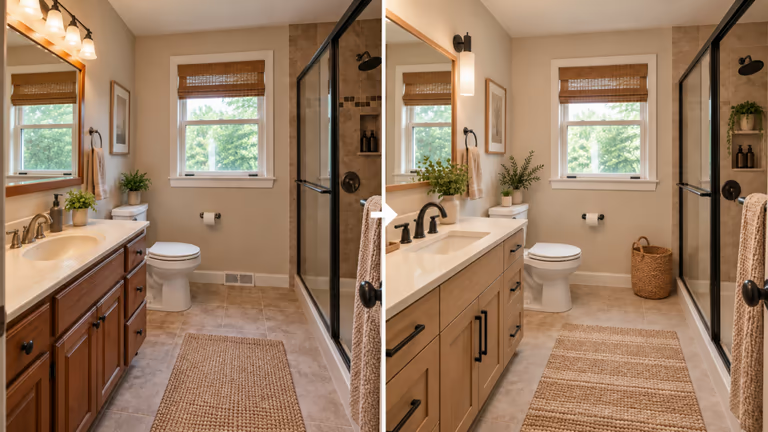
Genroom turns a bathroom photo into a new design. Choose a style to see different colors, cabinets and fixtures in your space. It gives you ideas for updating the room before you decide what to buy. You can use your current bathroom as the starting point, making the changes easier to picture. The finished image can also help you explain the look you want to the person doing the work.
Score: 7/8
Kept the plumbing: The toilet, sink, shower and window stayed in almost the same places. The picture cannot show whether the pipes stayed unchanged.
Free access: Genroom offers six free credits after sign-in, enough for three designs. A one-time pack costs $9.99 for 36 credits, valid for 180 days.
Best for: People who want to try different bathroom styles quickly without paying upfront.
Where it falls short: Free access requires signing in. The generated image also has a watermark and does not include exact measurements.
3. Paintit
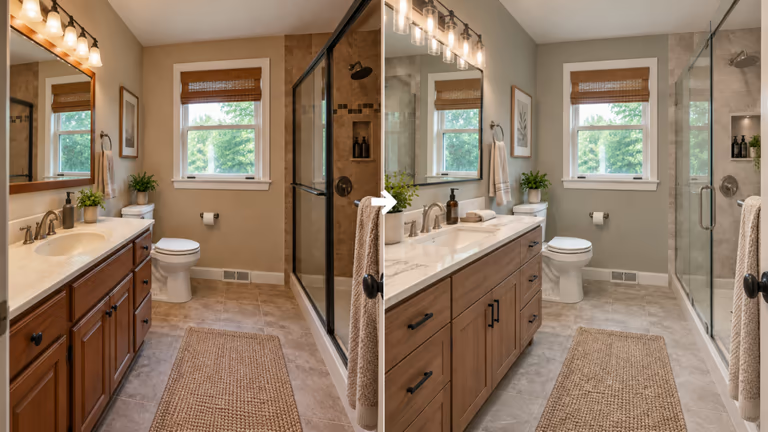
Paintit.ai helps you try a new bathroom look from a photo. You can ask it to keep the room layout while changing colors, cabinets and fixtures. It also offers a shopping list with links to stores, helping you find items for your design. It works in your browser.
Score: 7/8
Kept the plumbing: The sink, toilet, shower and window stayed in similar places. The wall vent was also kept, but the picture cannot confirm the pipe connections.
Free access: Paintit.ai offers 30 free credits, with each image using at least three credits. Free images are 1K size.
Best for: Trying small bathroom updates and finding products for the new look.
Where it falls short: Free images are limited to 1K size, and each design uses credits.
4. REimagineHome
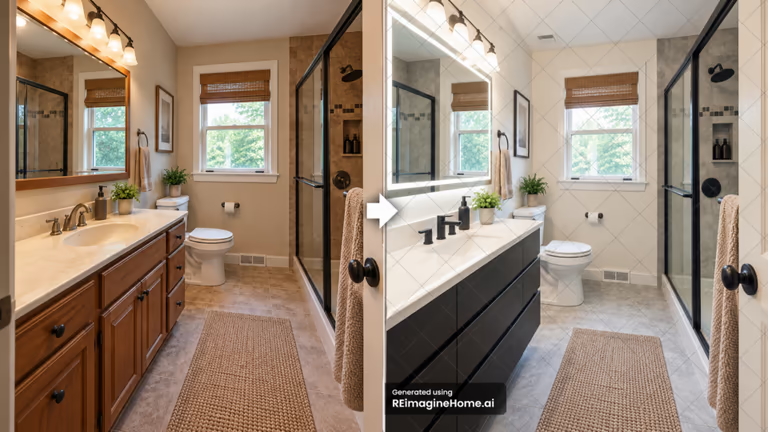
REimagineHome helps you try new bathroom colors, cabinets, tiles and lighting from a photo. It works in your browser. Its Structural Lock setting is designed to keep walls, windows and ceiling lines in place. It also suggests real furniture and decorations based on your budget and location. This shopping feature is available with Pro and higher plans.
Score: 6.5/8
Kept the plumbing: The toilet, sink, shower and window stayed in almost the same places. The wall vent was also kept, but the picture cannot confirm the pipe positions.
Free access: You get five free designs without adding a card or starting a trial countdown. The result we got had a watermark. Paid plans start at $19 a month.
Best for: People who want to preview different bathroom designs and find matching furniture to buy.
Where it falls short: The watermark made some small details harder to see. The sink bowl was unclear, and Structural Lock does not promise to keep every plumbing part in place.
5. Home Design AI
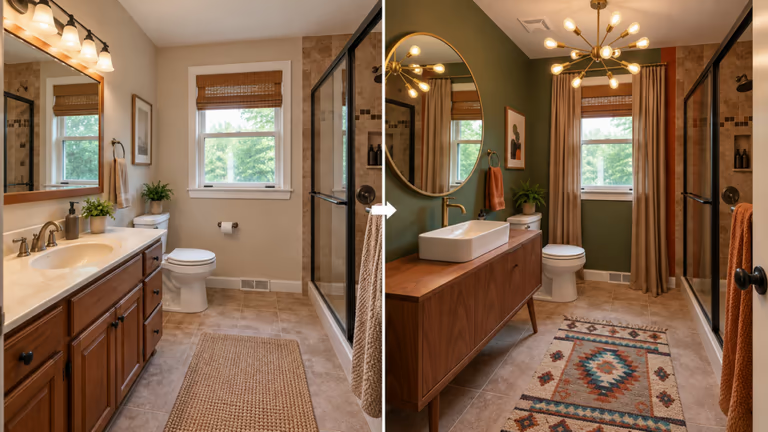
Home Design AI helps you picture changes to your bathroom before starting work. Upload a room photo in your browser and choose the look you want. You can try different colors, cabinets and decorations to find ideas for your space. The site also has a bathroom ideas section for inspiration.
Score: 6.5/8
Kept the plumbing: The toilet, shower and window stayed in similar places. The sink appears slightly shifted on the new cabinet.
Free access: Free credits are offered after login, but the number is not stated. The credits never expire. One-time packs start at $9.99 for 30 credits. Basic images use one credit each, while Pro images use more. See Home Design AI pricing.
Best for: Previewing bold colors and decor changes for a bathroom that needs a different feel.
Where it falls short: The new cabinet has less counter space. Long curtains may make cleaning harder, and the ceiling light needs checking for bathroom use.
6. RoomGPT
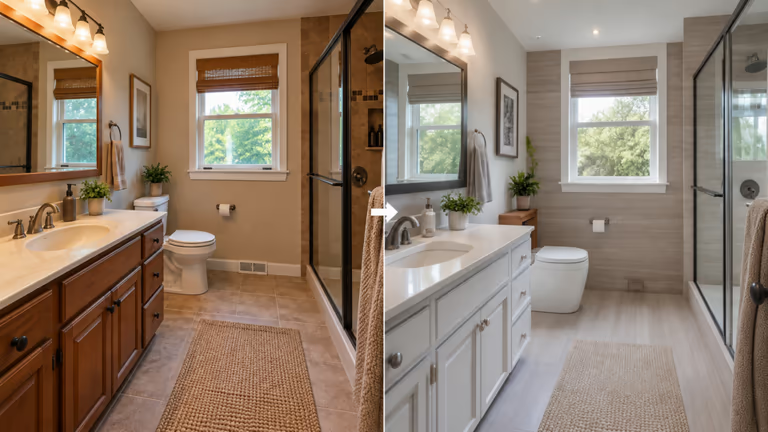
RoomGPT turns a room photo into a new design based on your chosen style. It works with different rooms, including bathrooms. You can use it to see how new colors and furniture might change your space. It is useful for getting a first idea of the look you want.
Score: 5/8
Kept the plumbing: The sink, shower and window stayed in similar places. However, the toilet's shape changed, its tank disappeared and the wall vent became unclear.
Free access: One free design is available after signing in with Google.
Best for: Seeing how a darker bathroom could look with white cabinets and lighter colors.
Where it falls short: Some cabinet handles and shower parts look blurry or uneven. Changes to the toilet and vent make the result less faithful to the original room.
Can ChatGPT Design Your Bathroom?
ChatGPT can create a new bathroom design from an uploaded photo. Describe the changes you want and the items you want to keep. Access to image tools depends on your plan and settings.
We uploaded the same bathroom photo used for the other app tests and entered this prompt: "Redesign the uploaded bathroom photo in a realistic, modern spa style. Use warm beige tiles, a natural wood vanity, soft lighting, and simple, elegant fixtures. Keep the original bathroom layout as close to the photo as possible. Preserve the sink, toilet, shower, window, wall vent, doors, and their positions. Do not add or remove major fixtures or change the room's structure. Make the materials, reflections, edges, and proportions look natural and believable. Create a high-quality, photorealistic image in a 16:9 landscape ratio."
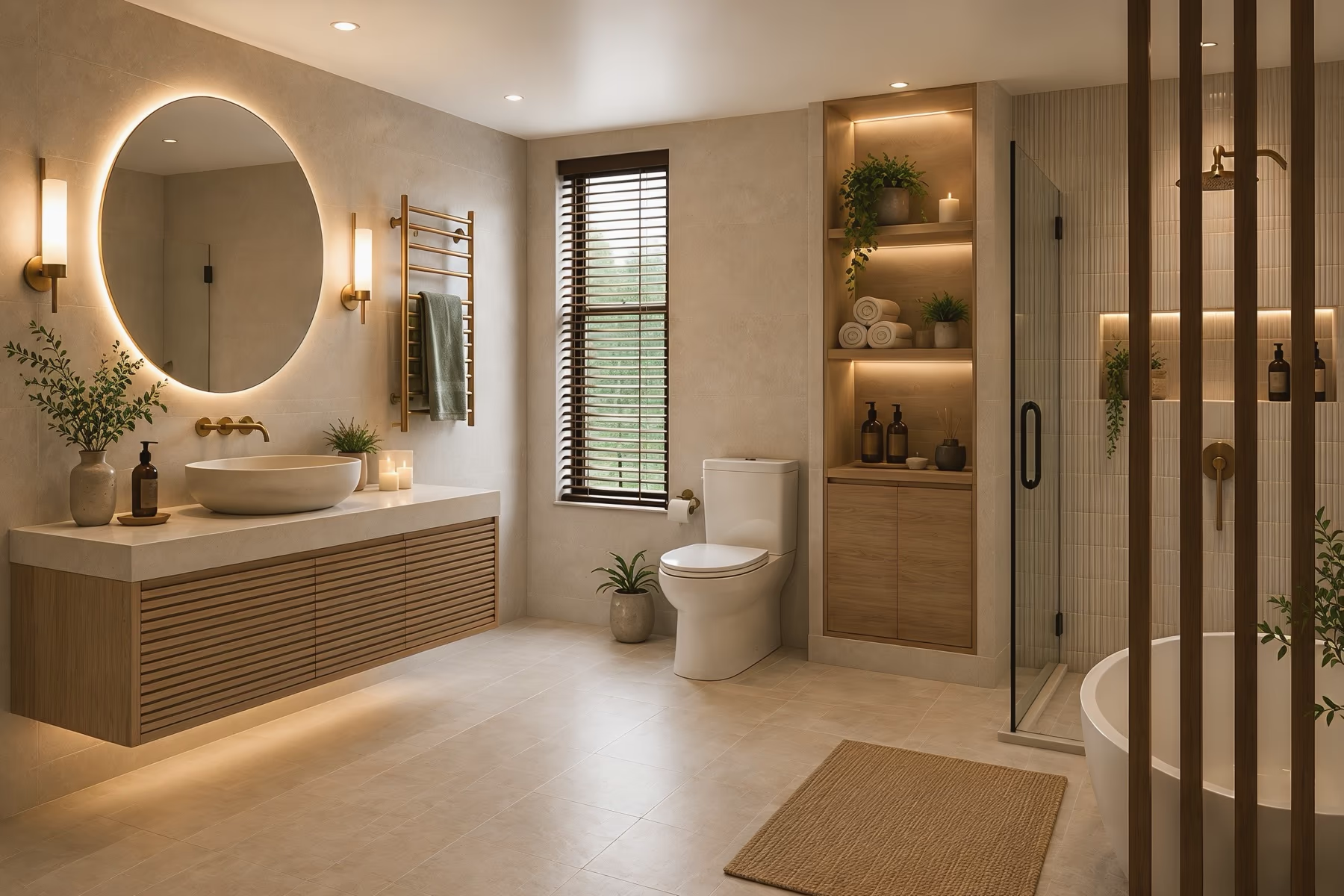
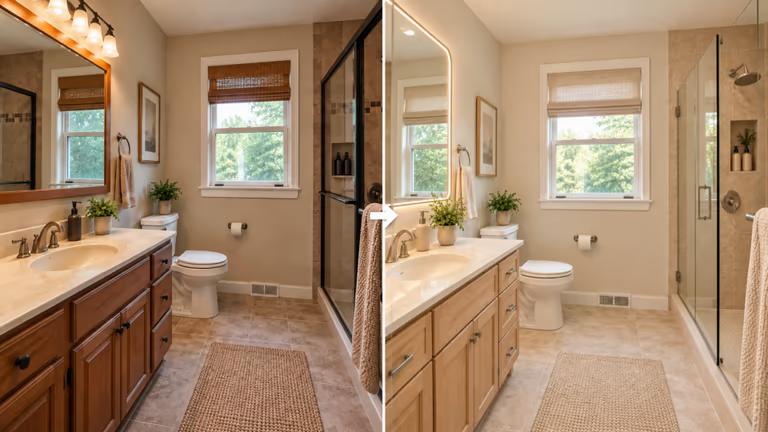
ChatGPT created a lighter bathroom design with wooden cabinets, cream surfaces and soft lighting.
Kept the plumbing: The sink, toilet, shower and window stayed in similar areas. The toilet tank and wall vent remained, although some sizes and distances looked different.
Best for: Creating bathroom design ideas from written instructions and asking for further changes.
Where it falls short: Written instructions do not guarantee that every item will stay in place. Small details and room sizes can still change in the image.
Which App Is Right for Your Bathroom?
| Your goal | Our pick | Why choose it? |
|---|---|---|
| Refresh tiles and wall colors | DecorAI | Surface Only lets you focus on tiles, paint and finishes. |
| Picture a complete makeover | DecorAI, Genroom or Paintit.ai | All three produced realistic images and scored 7/8. |
| Find products to buy | REimagineHome | Offers real furniture and decor suggestions on selected plans. |
| Check what fits your room | Planner 5D | Build a layout using your bathroom measurements. |
| Start without adding a card | REimagineHome | Offers five free designs after signup. |
When a Photo App Is the Wrong Tool
A photo app helps you see a new bathroom look. A measured planner helps you work out whether the changes will fit. Use a planner if you want a double sink, a larger shower or a different toilet position. Enter the room measurements and check the space around each item, including room for doors and drawers to open. These tools serve a different purpose, so we have not included them in the photo app scores.
- Planner 5D: Draw a bathroom layout and view it from above or in 3D. Its free version lets you start planning online.
- Houzz Pro: A tool for designers and remodelers who need floor plans and project estimates. It can use items from a 3D plan to help prepare an estimate.
- IKEA Bathroom Planner: Plan a bathroom around IKEA furniture and compare cabinet choices. It is useful when you intend to buy from IKEA.
Best Free AI Bathroom Design App
DecorAI is a good choice for trying bathroom designs without a watermark. Its free 1-day trial includes 3 designs using your own bathroom photo. A card is required. After the trial, the monthly plan costs $24.
REimagineHome is the best fully free option in this comparison if you want to try five designs without adding payment details. The free image we got had a watermark, which made some bathroom details harder to see.
Before choosing an app, check how many designs its free offer covers, whether it requires payment details, and whether the images have a watermark. Credits are not always equal to designs.
How to Photograph Your Bathroom for AI
A clear photo helps the app see your bathroom properly. Take a few minutes to prepare the room before uploading.
Shoot From the Doorway
Stand near the door or in a corner. Try to include the sink, toilet, shower or bath and window in one picture.
Turn On the Lights
Turn on the lights and open the blinds. Make sure the room is bright enough to see clearly. Avoid glare that hides details in the mirror.
Clear the Bathroom
Move bottles, clothes and towels that cover the surfaces. Close the toilet lid so the room looks tidy.
Hold the Camera Straight
Keep the camera level. Check that the walls and cabinet edges look straight before taking the photo.
Say What Should Stay
Describe the look you want and name the items that should stay in place. If the app has a negative prompt box, use it to list colors, objects or materials you do not want.
For example: "Use white tiles, a walnut cabinet and brass faucets. Keep the sink, toilet, shower and window where they are." Negative prompt: "No dark tiles, no bathtub, no gold mirror."
Save your favorite design, then change one thing at a time, such as the tiles, cabinet or lighting. Compare each version to see which change you prefer.
What AI Bathroom Design Apps Cannot Do
AI bathroom apps show how your room could look. The picture does not give you building instructions or show the pipes and wires inside the walls. It also cannot tell you whether water could leak.
Some items in the design may not be available to buy. Colors and materials may look different in real life. Show the design to the person doing the work. Check product sizes and real samples before buying. If you use an online cost calculator, treat the price as a rough guide. Ask for a quote based on your own bathroom.
Want to see a new look for your bathroom? Upload your bathroom photo to DecorAI and try new colors, tiles and styles before deciding what to change. Try DecorAI's bathroom design tool today.
Frequently asked questions
Yes. Upload a clear photo to a tool such as DecorAI, Genroom or Paintit.ai to try a new look. Check whether the sink, toilet and shower stayed where you wanted them.
Yes, if image editing is available on your account. Upload a photo and describe the changes you want. Our result kept the main items in similar places, although some sizes and distances looked different.
Yes. DecorAI offers a free 1-day trial with 3 watermark-free designs. A card is required. REimagineHome offers five free designs without a card, while Paintit.ai provides 30 free credits.
DecorAI is a good choice for watermark-free pictures during a short trial. REimagineHome offers more free designs without a card, but the image we reviewed has a watermark. Choose based on what matters most to you.
A photo app can suggest a layout, but its picture does not prove that everything fits. Use a measured planner such as Planner 5D to draw the room to size. Ask the person doing the work to check the plan and any pipe changes.