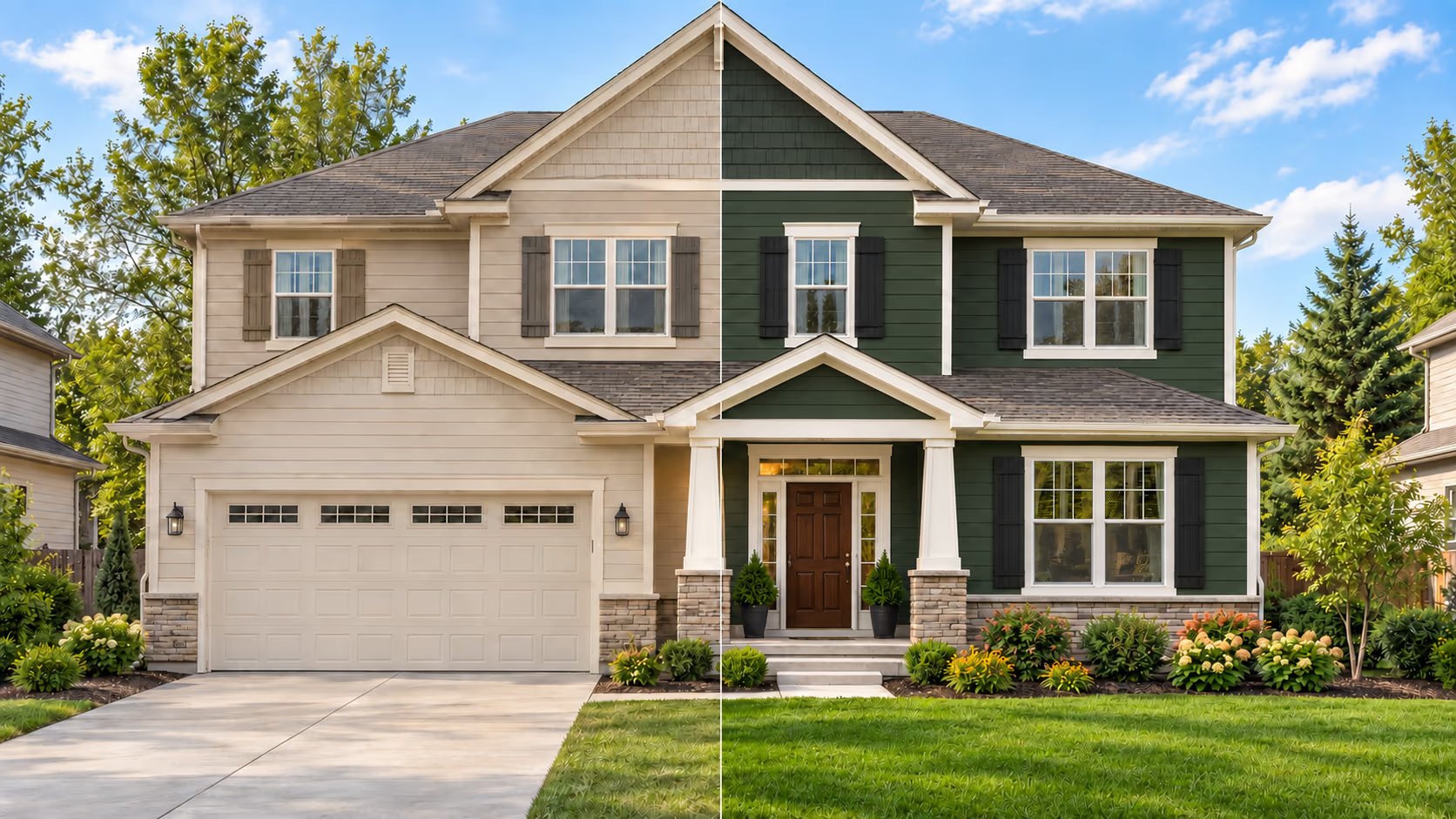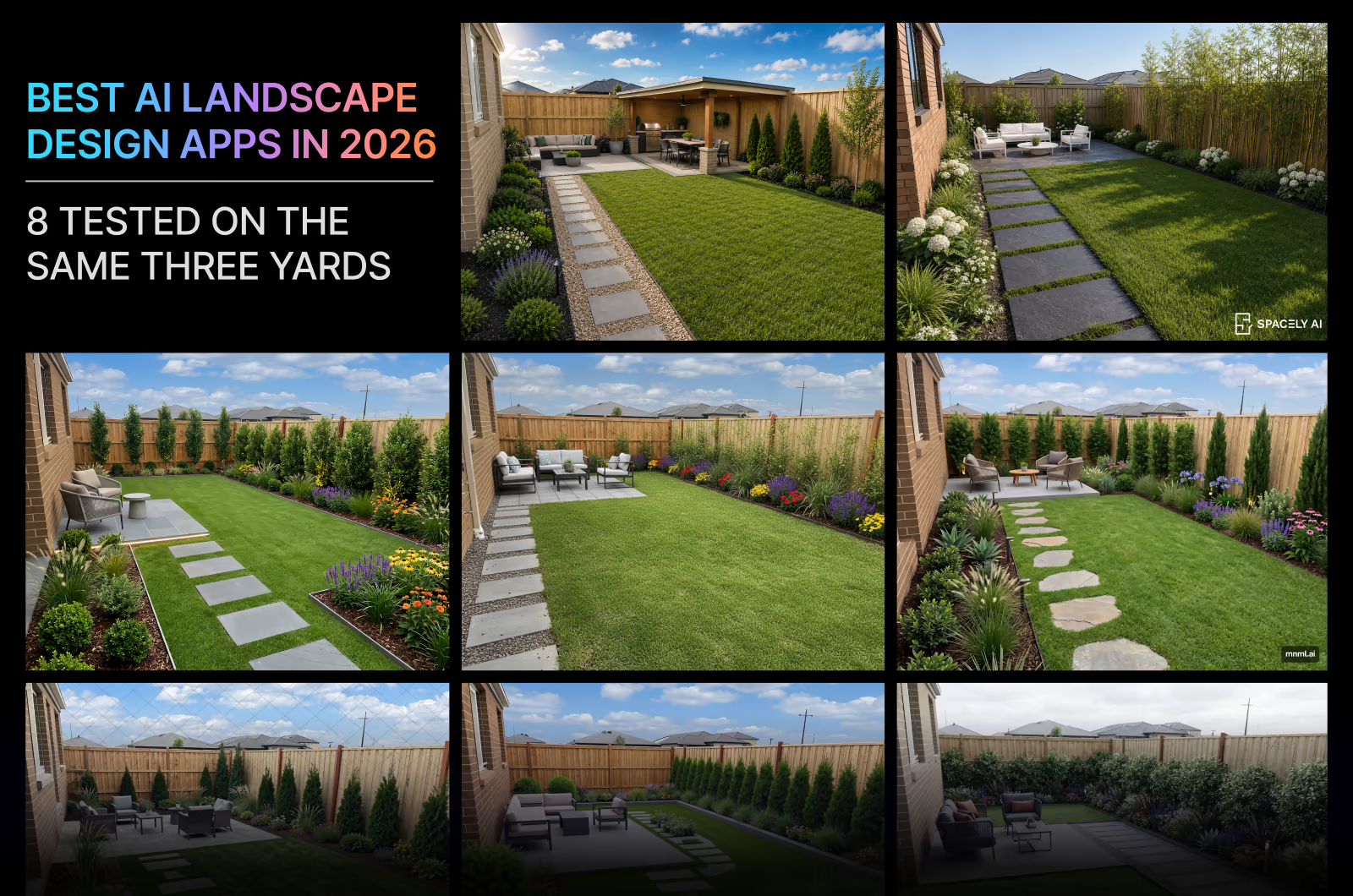
The best AI landscape design apps help homeowners and professionals visualize landscaping ideas before starting an outdoor project. With these apps, you can generate photorealistic landscape ideas before you make any costly decisions. They help test layouts, materials, and plants in your actual yard instead of guessing from a mood board. Most AI landscape design apps generate practical, buildable landscape ideas that preserve existing structures, dimensions, and space, which is why homeowners, landscapers, and designers are increasingly using them as the first step in outdoor renovation projects.
Once you find a design you like, you can share it with your landscaper or contractor as a visual reference. But not all AI landscape design apps deliver realistic and practical results. Some visualize designs that look impressive but ignore your yard's actual dimensions, invent structures that would never be permitted, or suggest plants that won't survive your climate.
So we tested 8 apps on a front yard, a backyard, and a garden using the same 3 photos, identical prompts, and the same available settings to see how each one actually performs. We evaluated and compared the results for you, scoring realism, layout preservation, plant quality, and more, so you don't have to test them yourself.
🏆 Best Overall: DecorAI
🖼️ Best Image Quality: DecorAI
🏡 Best for Homeowners: DecorAI
📐 Best for Professionals: Spacely AI
⚡ Fastest Result: ReimagineHome
How We Tested 8 AI Landscape Design Apps
To find the best AI landscape design apps, we tested all 8 tools by strictly following these criteria and conditions:
- Input Photos: Same 3 original photos (front yard, backyard, garden) for every app.
- Style Setting: Modern landscape style selected where available.
- AI Creativity Setting: Default setting only, with no manual adjustments.
- Device: Same device used for every test.
- Internet Connection: Same connection throughout.
- Generation Attempts: First generation only, with no regeneration or re-rolling.
- Result Selection: No cherry-picking; the first output is shown as-is.
- Pricing: Verified at the time of testing.
- Tested on Free Trial: We tested each app using its free trial.
- Account Type: Tested the top apps with a free trial.
- Testing Time: Tested in a single day in August 2026.
We used the following prompts for tools that support custom prompts:
Front Yard Landscaping Prompt: "Turn this bare front yard into a modern landscaped front yard. Add a healthy green lawn. Add layered shrubs, ornamental grasses, a few small trees, and a limited number of colorful flowering plants around the house and porch. Keep the house, driveway, walkway, fence, and existing mature trees exactly unchanged."
Backyard Landscaping Prompt: "Turn this bare backyard into a modern landscaped backyard. Add a small patio with outdoor seating, a simple stepping-stone path, a healthy lawn, planting beds with shrubs, ornamental grasses, and a few colorful flowers, plus some screening plants along the fence. Keep the house, fence, and property boundaries unchanged."
Garden Landscaping Prompt: "Redesign the porch garden with mulch, mature shrubs, ornamental grasses, and a few colorful flowering plants. Add a simple half-buried brick border along the garden edge. Keep the house, porch, walkway, driveway, lawn, and existing trees exactly unchanged."
Every app was tested under identical conditions. We did not regenerate images to obtain a better result, ensuring every comparison reflects the tool's default performance.
How We Scored Every App
While scoring, we used the following evaluation criteria:
| Category | Description |
|---|---|
| Realism | Does it resemble a real photograph? |
| Prompt Following | Did it follow the instructions? |
| Layout Preservation | Did it keep the house, trees, fences, and boundaries? |
| Plant Quality | Are plants real, identifiable, and believable? |
| Style Count | How many styles does the app offer? |
| Seasonal Mode Control | Can different seasonal modes be applied? |
| Hardscape Quality | Are the patios, paving, walls, and paths practical? |
| Iteration | Can edits be refined without degrading? |
| Speed | How long did it take to generate the result? |
The Three Outdoor Spaces We Used for the Tests
Front Yard Reference Photo
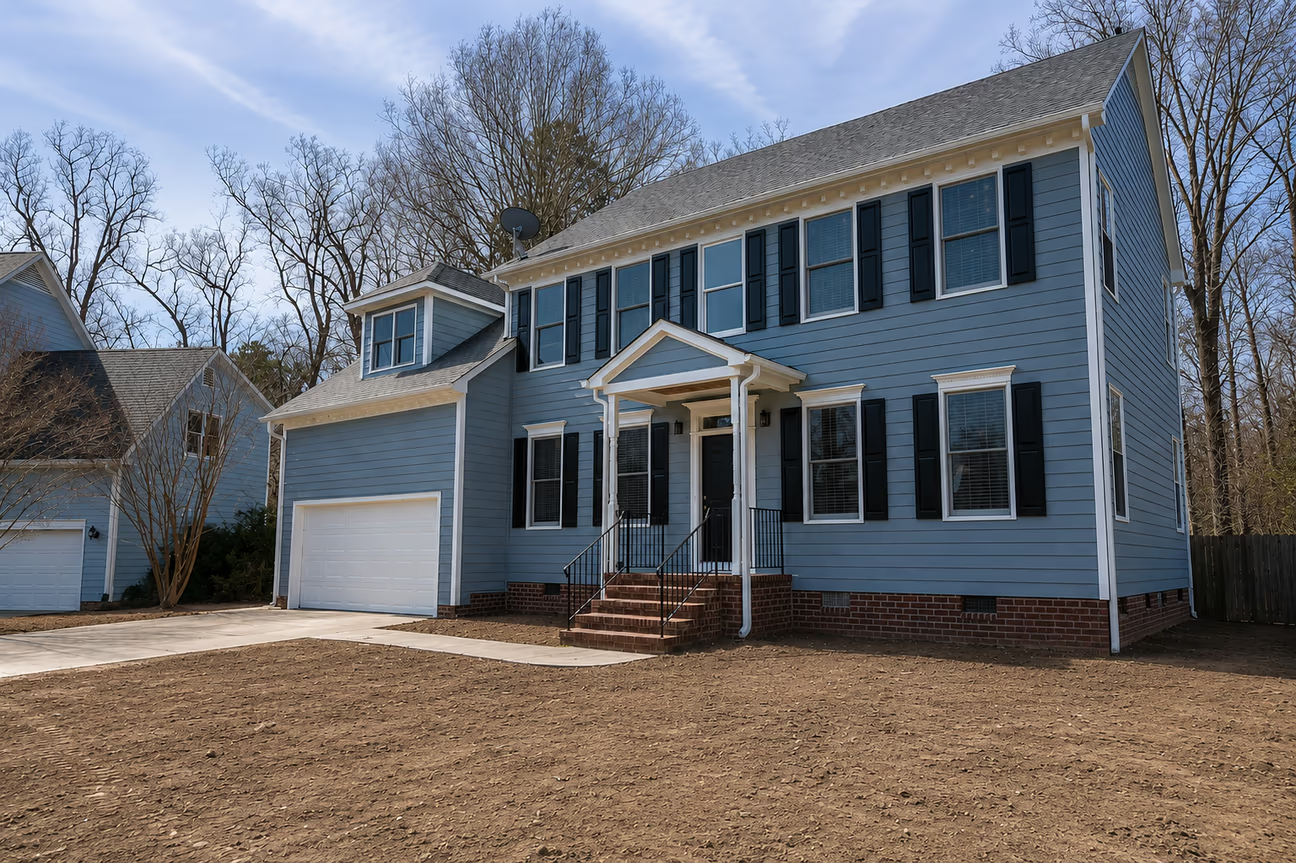
We chose this unfinished front yard to put the apps to the test. We preferred a front yard photo that was taken from an angle to create a more difficult test. Also, we wanted to see how each app could make this house look attractive with the landscaping idea.
Challenges for the AI landscape design apps:
- Landscape Quality: Does the yard look professionally designed and match the overall look?
- Realism: Do plants, grass, trees, and shadows look realistic?
- Architecture Preservation: Did the app keep the house architectural features and hardscape intact?
- Layout: Did the app preserve the house, yard, garden bed, and fence layout?
- Perspective & Scale: Does everything look correctly sized and positioned?
- Overall appeal: Would a homeowner actually want this design?
- Practicality: Is the visualized landscape actually buildable?
Backyard Reference Photo
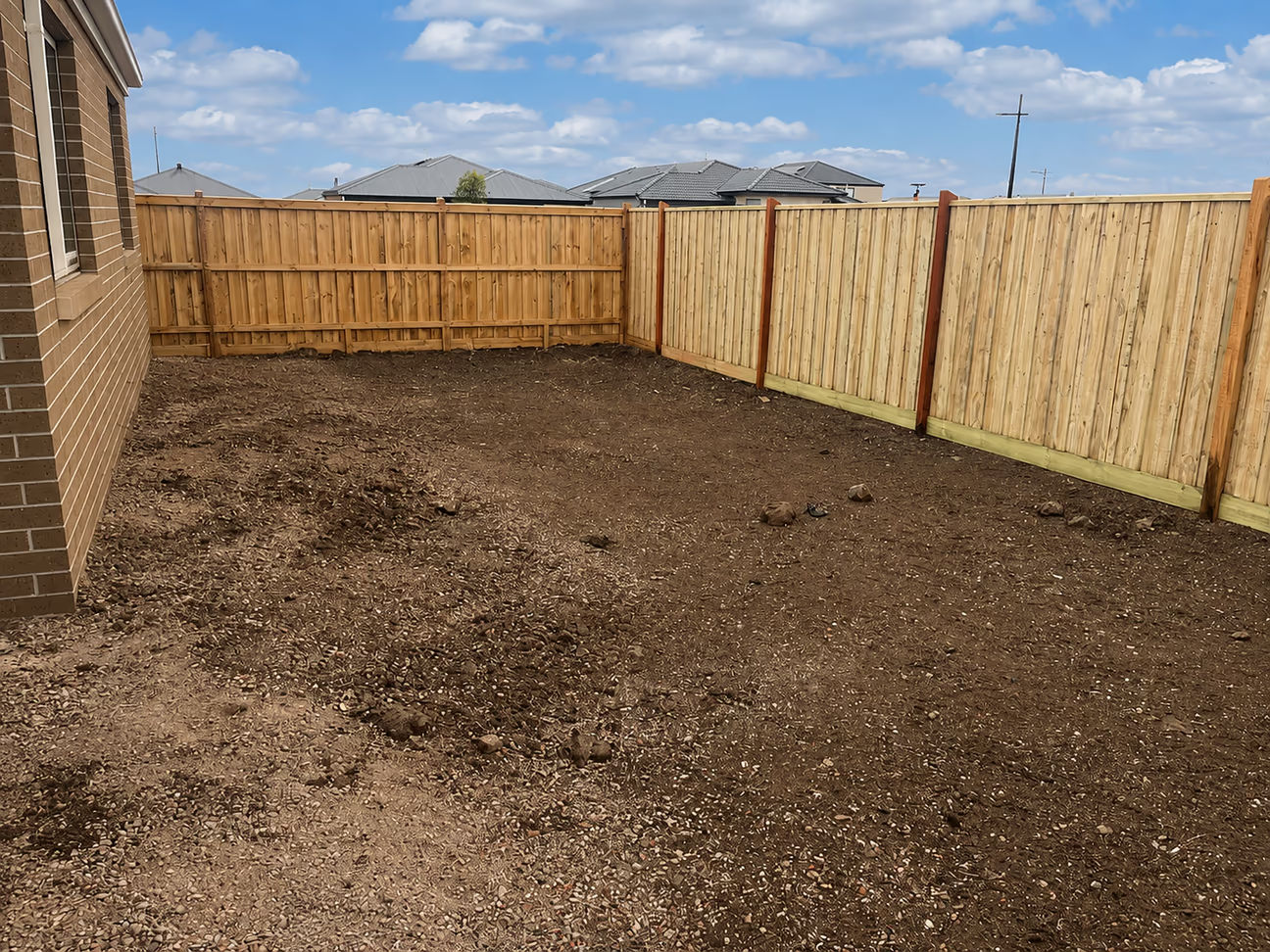
This backyard is essentially a blank canvas. With bare dirt and no lawn, plants, or hardscape, this yard gave every app a blank canvas. We wanted to see whether each app could take a blank space and create a landscaping idea that looks intentional, consistent, and buildable, rather than defaulting to a generic template.
Challenges for the AI landscape design apps:
- Blank Canvas Layout: With no existing plants, beds, or hardscape to work from, will the app design a logical, well-zoned layout, or will it place elements randomly?
- Fence Line Accuracy: The yard is bordered by an angled, two-tone timber fence with visible posts. Will the app preserve the fence line, height, and material, or alter them?
- Architecture Preservation: The brick house wall and window on the left must remain unchanged. Does the app keep the house structure intact while designing around it?
- Perspective & Scale: The yard narrows toward the back corner. Will planting beds, paths, and features respect this converging perspective, or will they look flat and misaligned?
- Ground Transformation Realism: The current surface is bare dirt and gravel. Does the app generate a believable transition to lawn, mulch, or hardscape, or does it look pasted on top?
- Background Consistency: Neighboring rooftops and sky are visible above the fence line. Does the app leave this untouched, or does it introduce unwanted changes outside the yard boundary?
- Practicality: Is the generated design something a homeowner could realistically build given the yard's actual size and fence constraints, or does it suggest features that wouldn't fit?
- Overall Appeal: Would a homeowner look at this result and feel it solves the "empty yard" problem in a way that feels finished and intentional?
Garden Reference Photo
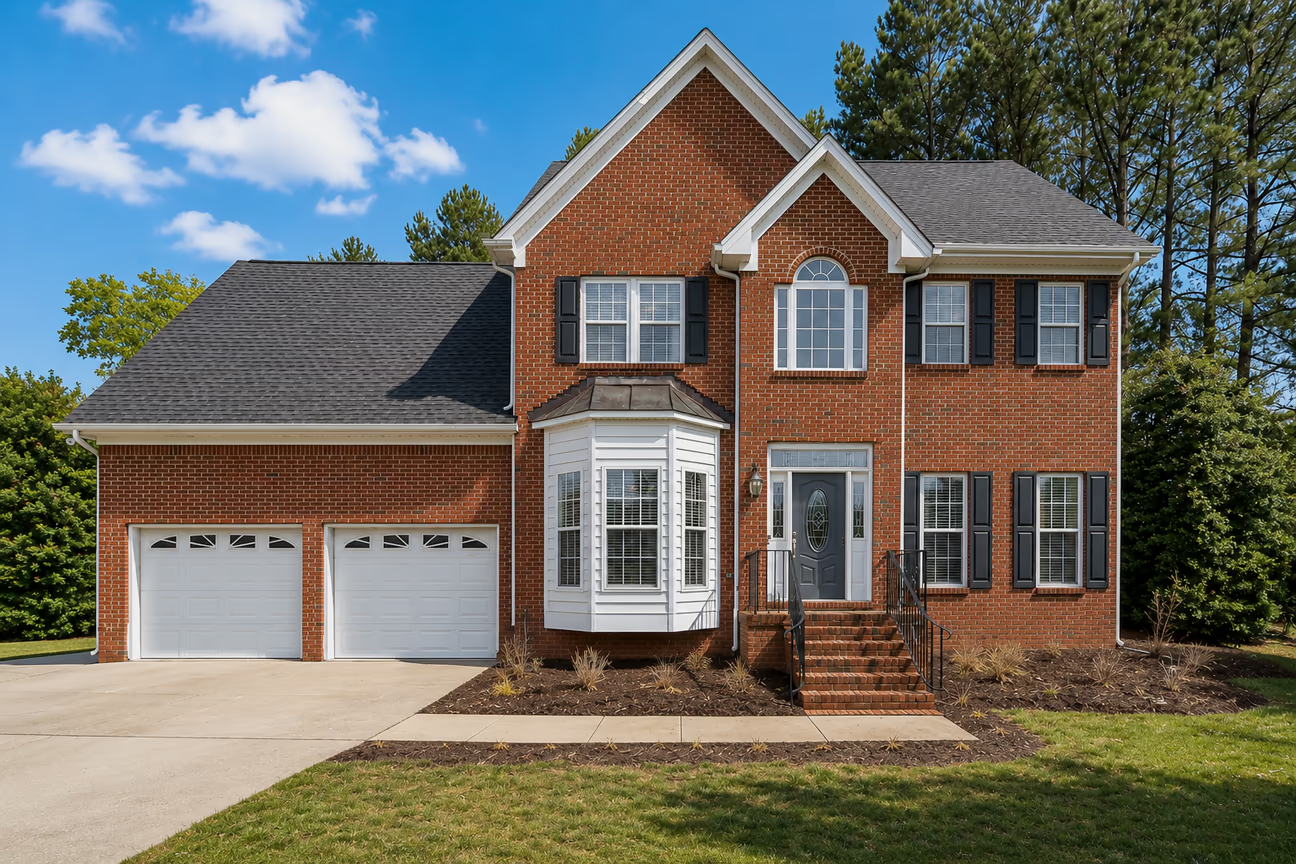
With this front yard, the challenge for the AI tools was to generate a practical refresh of the front porch with a garden. Unlike the empty backyard, this front yard already has a lawn, mature trees, and existing foundation beds along the porch and walkway. Our goal was to see whether each app recognizes the difference between a full landscape redesign and a focused porch garden refresh. The challenges included improving the planting beds around the entrance without touching the lawn, trees, or hardscape that already work.
Challenges for the AI landscape design apps:
- Garden Upgrade vs. Full Makeover: The yard already has a lawn, mature trees, and foundation beds in place. Will the app make smart, proportional improvements to the porch garden, or will it overdesign a yard that didn't need a full redesign?
- Architecture Preservation: The brick facade, windows, iron railings, and brick steps must stay untouched. Does the app respect the existing structure, or does it alter details it shouldn't touch?
- Bed Continuity: The existing foundation beds are sparse but well-placed. Does the app densify and improve the current porch planting, or does it discard the existing bed shape and start over?
- Style Consistency: This is a traditional brick colonial house common in the southeastern United States. Does the app choose plants and materials that match a classic aesthetic, or does it default to a generic modern look that clashes with the architecture and regional requirements?
- Mature Landscape Integration: Large established trees already frame the property. Does the app work around them realistically, or does it awkwardly place new elements that ignore their size and shadow?
- Lawn and Hardscape Preservation: The driveway, walkway, and lawn are already in good condition. Does the app leave them intact and focus only on the porch garden, or does it unnecessarily redesign hardscape that wasn't part of the problem?
- Realism: Do new plants match the lighting, shadows, and scale of the existing photo, or do they look pasted on top of the original image?
- Practicality: Is the result something a homeowner could realistically build as an incremental porch garden upgrade, or does it require tearing out everything that already works?
Quick Comparison: Best AI Landscape Design Apps in 2026
| App | Score /10 | Realism | Prompt Following | Layout Accuracy | Avg Speed | Monthly Price |
|---|---|---|---|---|---|---|
| DecorAI | 9.1 | Excellent | Excellent | Excellent | ~30 sec | $24/month |
| Dehome | 8.2 | Excellent | Good | Good | ~1 min 10 sec | $9.99–$399/credit pack |
| mnml | 7.2 | Good | Good | Good | ~45 sec | $29–$119/month |
| Home Design AI | 7.0 | Excellent | Poor | Poor | ~40 sec | $19.99–$99.99/month |
| Spacely AI | 6.3 | Excellent | Poor | Poor | ~1 min 15 sec | $25–$100/month |
| ReimagineHome | 6.3 | Good | Poor | Poor | ~20 sec | $19–$119/month |
| ArchyBase | 5.0 | Poor | Poor | Poor | ~45 sec | $19.99–$89.99/month |
| Ideal House | 4.5 | Poor | Poor | Poor | ~40 sec | $19–$99/month |
1. DecorAI
OVERALL SCORE: 9.1 / 10
Front Yard: 9.2
Backyard: 9.3
Garden: 8.8
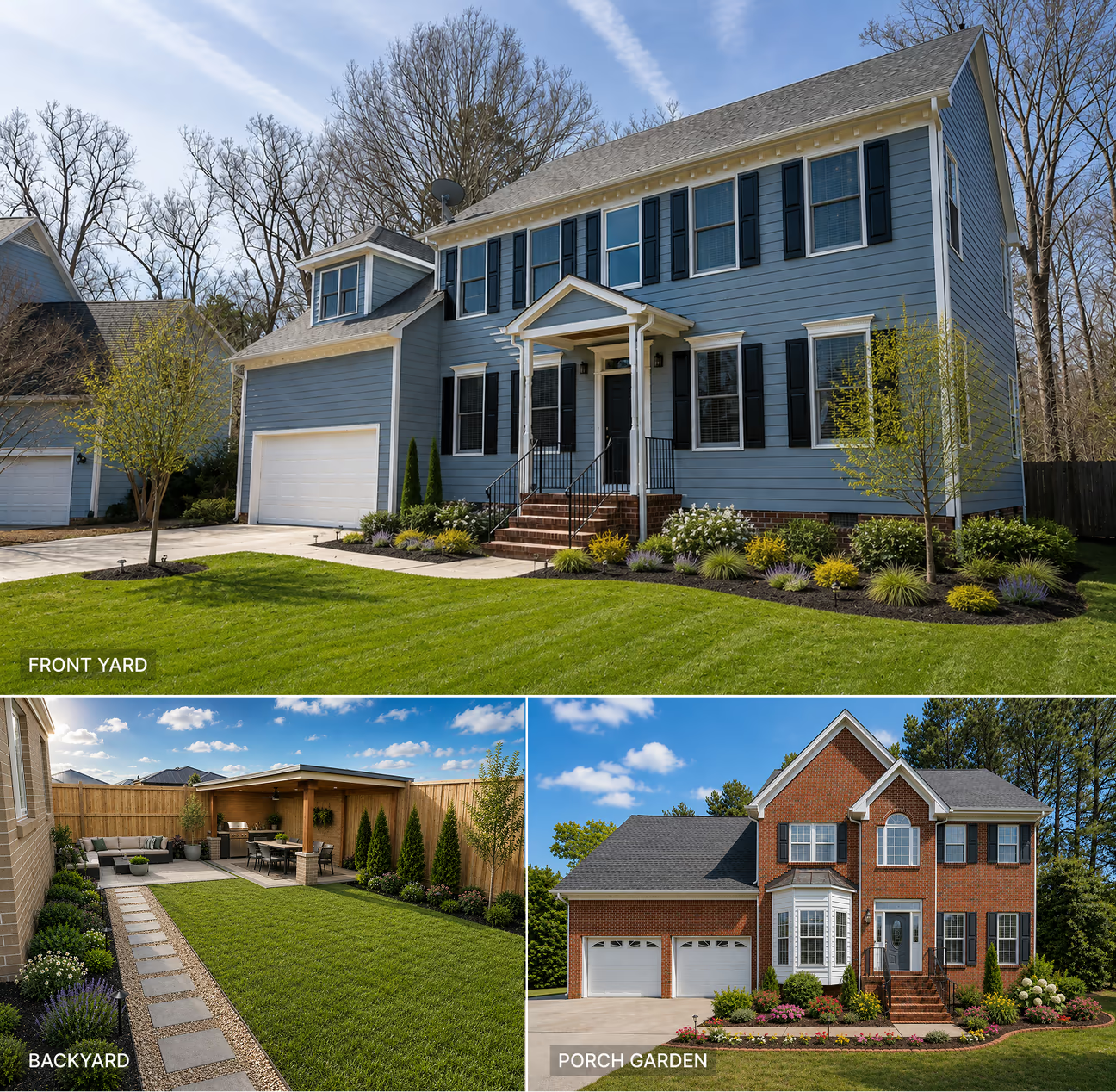
DecorAI landscape design app generated realistic landscape designs for all three spaces. It added buildable landscaping features while keeping the main property details in place. The app identified the scope of the landscaping and implemented it with clear details and accuracy. It added an outdoor kitchen with a covered patio and dining area.
WHAT IT DID WELL:
DecorAI added shrubs, flowers, grasses, and small trees to the front yard. It preserved the house, driveway, walkway, and existing trees in place. The sizing of the beds and plants is logical. The lighting and shadows blend naturally with the original photo.
In the backyard, it added a covered patio, a seating area, a dining space, a lawn, a stepping-stone path, shrubs, and flowers. It transformed the bare backyard into an outdoor living and entertainment space. It kept the fence and house layout intact.
For the porch garden, it added mulch, mature shrubs, hydrangeas, colorful flowers, ornamental grasses, and a half-buried brick border. It also filled the narrow garden area along the lawn instead of leaving it empty. The app preserved the existing landscaping features, including the house architecture, surrounding trees, and the lawn.
WHAT COULD IMPROVE:
It could have added a few colorful flower plants to the porch garden in the front yard landscape design. In the backyard, the color of the fence looks slightly off. The porch garden could have a direct walkway to the lawn from the entrance.
AVERAGE GENERATION TIME: ~30 seconds
PRICING: $24/month (unlimited designs)
RECOMMENDATION: Best for homeowners for complete, ready-to-use landscape designs and real estate professionals who want quick landscaping ideas for their clients.
2. Dehome
OVERALL SCORE: 8.2 / 10
Front Yard: 9.0
Backyard: 8.5
Garden: 7.0
The Dehome app has a dedicated tool for landscape design with 6 landscape styles, 5 pathway styles, and terrain selection. It gives control over sun exposure and maintenance level. The generated landscape ideas look professional with some minor issues. It followed the main design direction well, with mostly accurate planting layouts.
WHAT IT DID WELL:
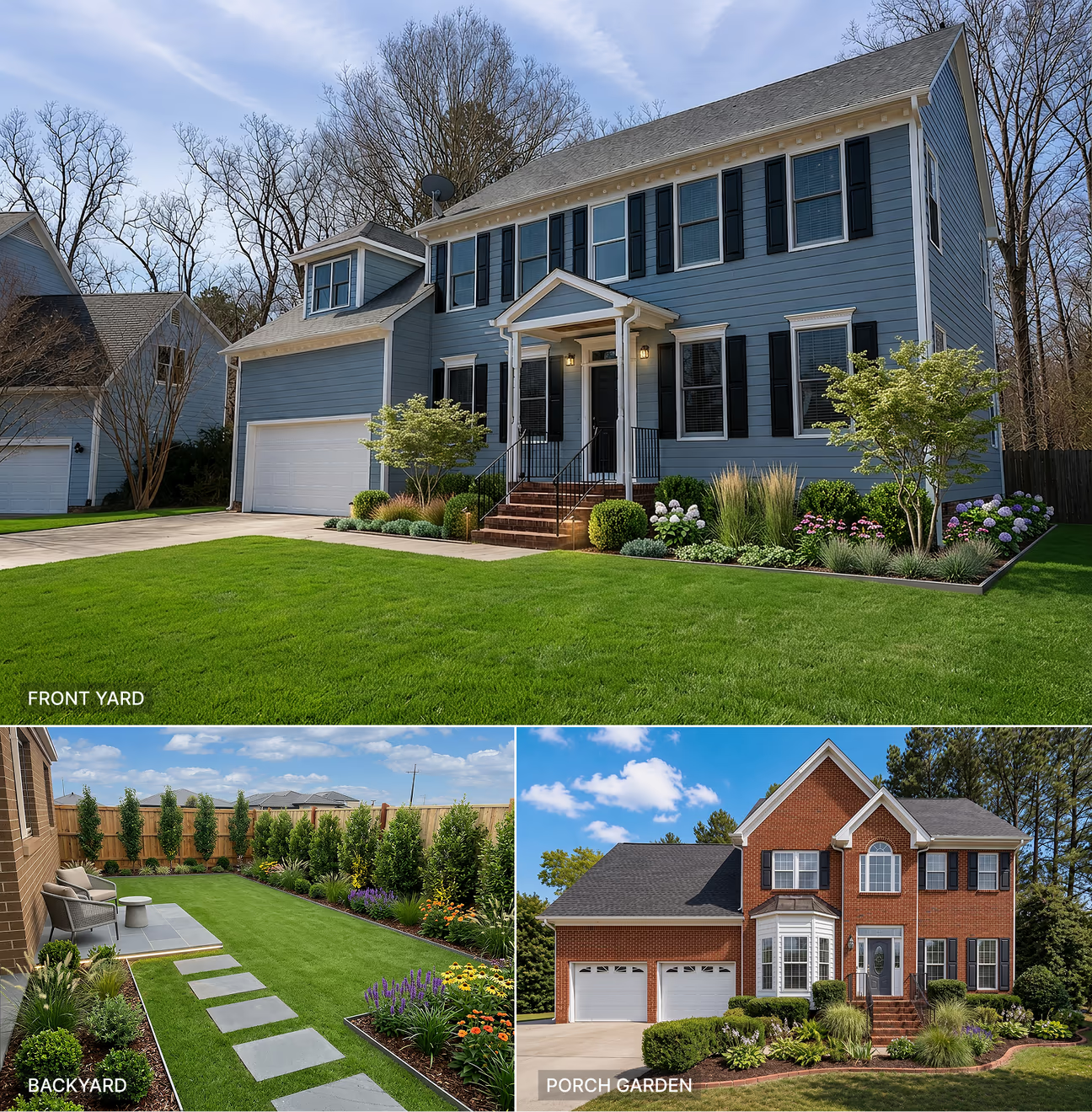
Dehome generated an excellent landscape idea for the front yard. It handled the challenges very well. It preserved the home architecture and features and generated a healthy lawn and a charming porch garden. It extended the porch garden through to the fence along the left wall of the house.
The backyard garden is well visualized. The patio and the stone walkway align well. It added colorful flowers to the garden that make the backyard appealing.
The plants and the shrubs match the overall scene in the front porch garden. It preserved the house architecture, color, lawn grass, and trees as they were in the reference image
WHAT COULD IMPROVE:
In the front yard landscaping idea, the electric lights look awkward in bright daylight. It added more plants than needed, which can be hard to maintain if implemented. The same happened for the backyard and porch garden idea. In the garden challenge, it failed to keep the original garden layout. It changed the layout to a curved garden that took up a large part of the lawn.
AVERAGE GENERATION TIME: ~1 minute 10 seconds
PRICING: $9.99 – $399/credit pack
RECOMMENDATION: Dehome's Landscape Design tool is a good option for homeowners who are looking for overall landscape design ideas.
3. mnml
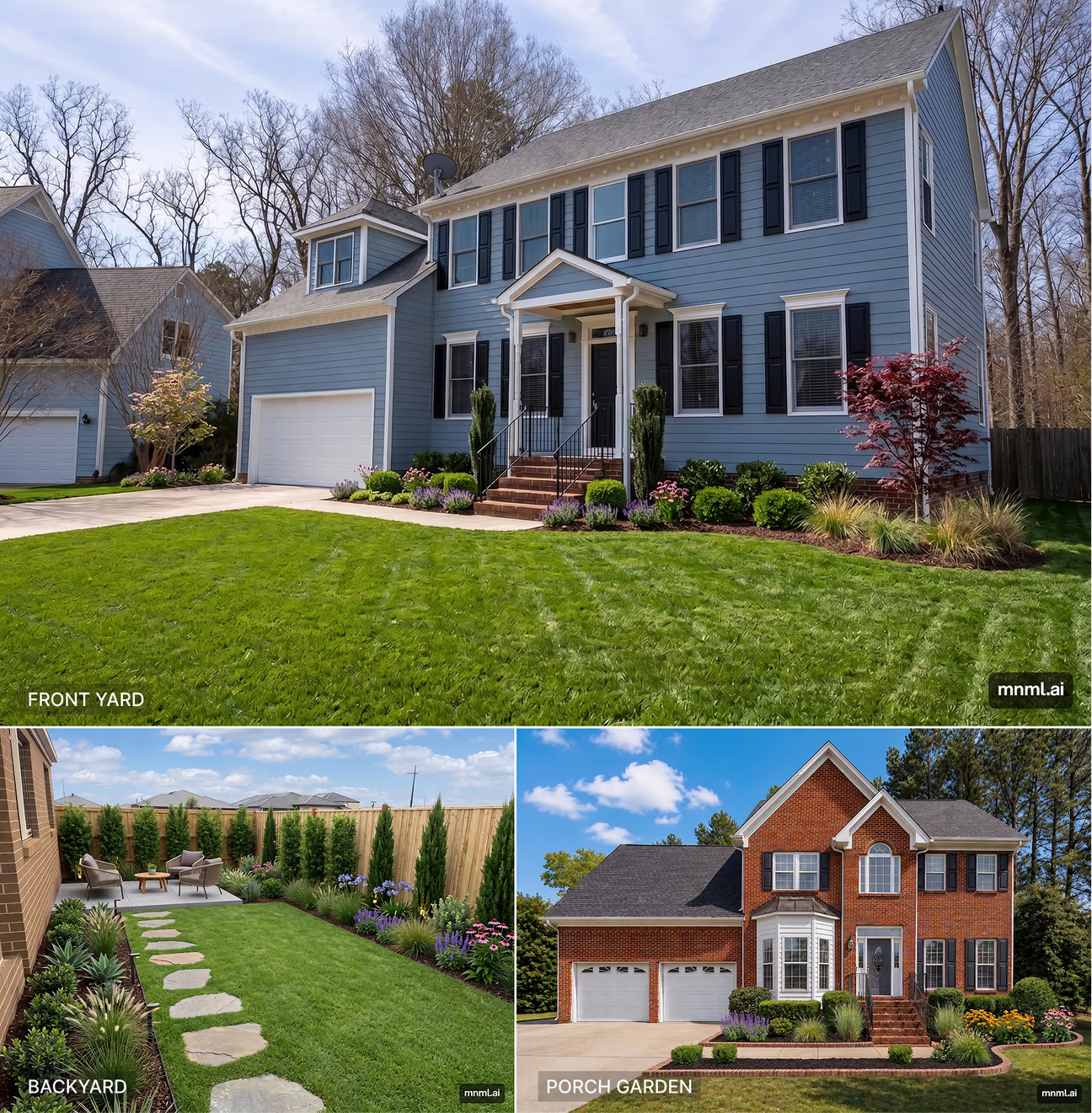
OVERALL SCORE: 7.2 / 10
Front Yard: 8.0
Backyard: 6.0
Garden: 7.5
The mnml app created neat and modern landscaping for all three spaces. It used simple plant groupings and clean garden edges, but some of the designs changed the original layouts more than needed.
WHAT IT DID WELL:
The mnml app preserved the overall front yard layout and the house architecture. It even added plants and grass to the right of the garage. It added plants in groups to the porch garden. The rest of the lawn was visualized with thick, healthy grass.
In the backyard, it zoned the lawn, garden, and the patio area. It elevated the patio with a concrete slab, which is practically a good approach, as this method keeps patios dry after rain.
Plants in the porch garden were also zoned. It preserved the house architecture, driveway, and the walkway.
WHAT COULD IMPROVE:
The grass looks unrealistic. The backyard has too many plants for a small backyard. So many plants can be difficult to maintain. The house layout was slightly changed in the backyard challenge. On the other hand, the app did not add enough plants to the narrow bed of the porch garden. It left some parts empty. This makes the garden feel unfinished.
AVERAGE GENERATION TIME: ~45 seconds
PRICING: $29 - $119/month (credit-based)
RECOMMENDATION: Choose this app if you want more detailed landscaping ideas and more control over the redesigns.
4. Home Design AI
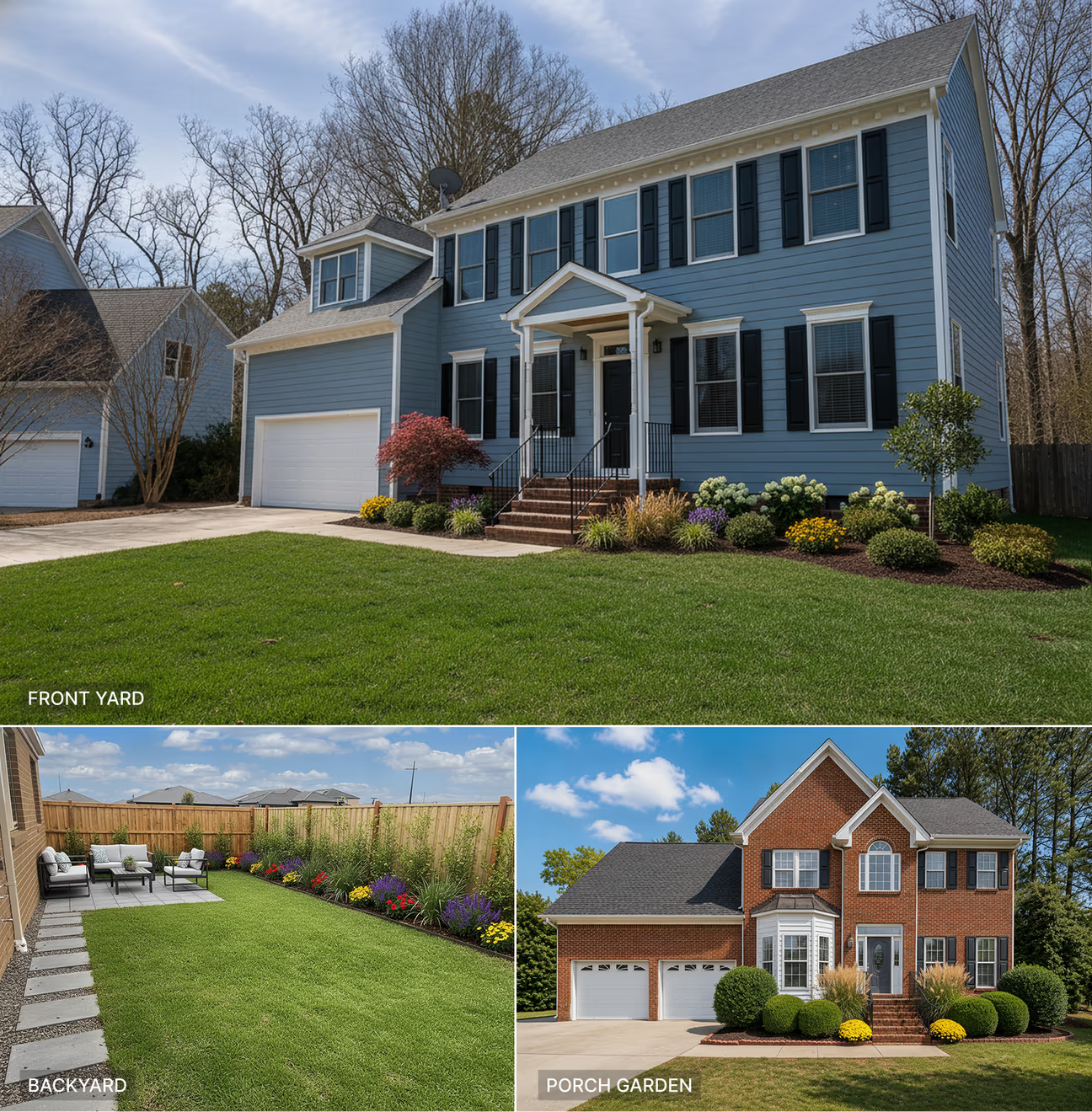
OVERALL SCORE: 7.0 / 10
Front Yard: 7.5
Backyard: 7.0
Garden: 6.5
The Home Design AI app generated photorealistic landscaping ideas for the yards. The plants, grass, mulches, and landscaping materials look realistic in all three yards. But some of the results were less detailed than those of the other apps.
WHAT IT DID WELL:
The front yard landscaping idea it generated blends with the overall scene. The grass and plants look real and are easy to maintain.
The backyard looks welcoming with the green lawn and colorful flowers along the fence. It left enough lawn space for entertainment and other activities by placing the patio on the corner.
In the porch garden challenge, the app preserved the house architecture and overall front yard layout. The plants in the porch garden look balanced with rounded shrubs and the brick border.
WHAT COULD IMPROVE:
The main weakness of the app is the lack of detail in all three yards. The backyard area looks longer than the reference photo. It removed the narrow part of the porch garden on the lawn side.
AVERAGE GENERATION TIME: ~40 seconds
PRICING: $19.99 - $99.99/month (credit-based)
RECOMMENDATION: You can choose this app for landscaping ideas if you can compromise on picture details and minor layout changes.
5. Spacely AI
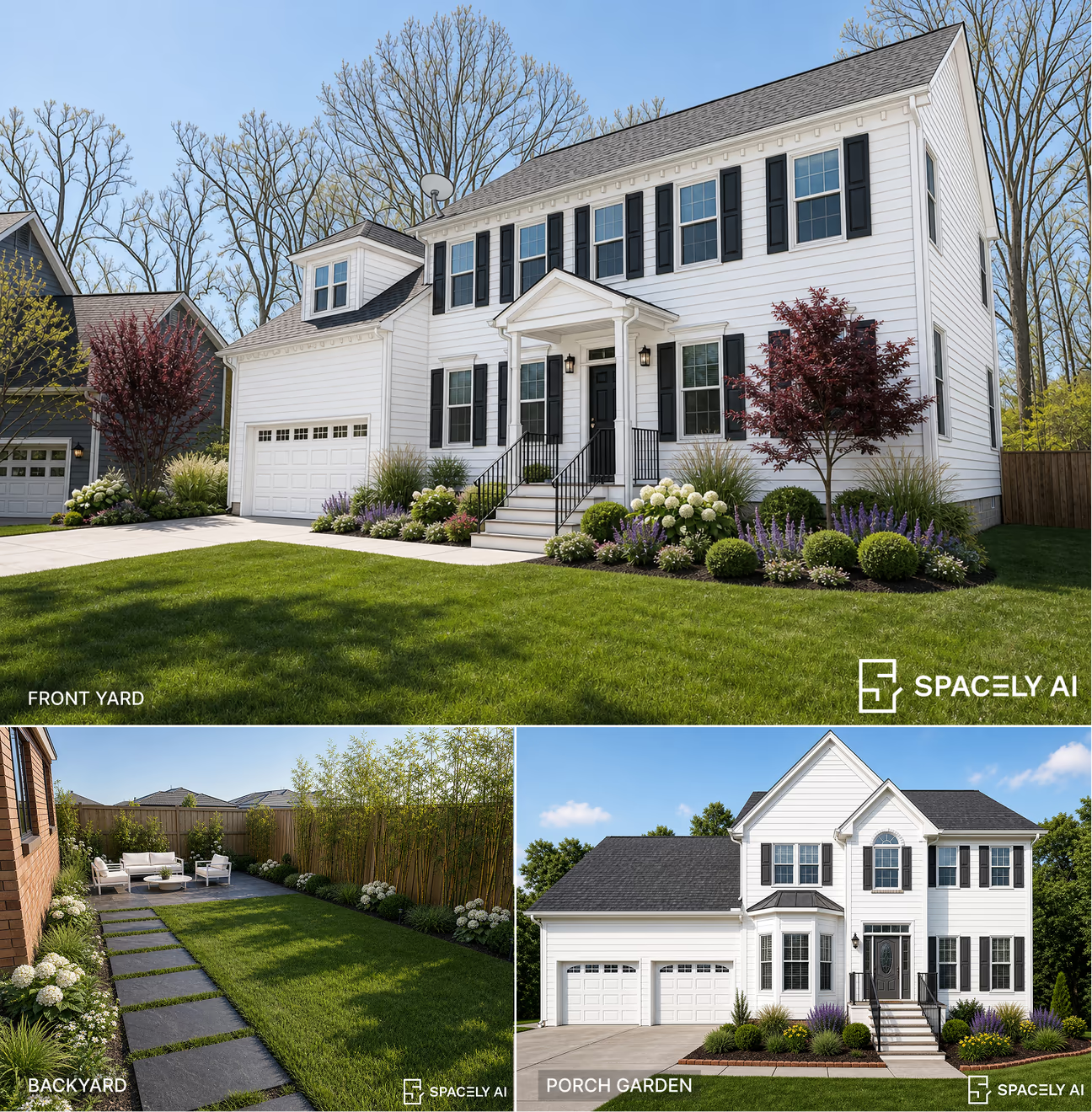
OVERALL SCORE: 6.3 / 10
Front Yard: 5.5
Backyard: 8.5
Garden: 5.0
Spacely AI is a professional-friendly AI design app with integration features for 3rd party apps. The Creative Landscape tool of the Spacely AI app created clean and organized landscape designs for all three spaces. The landscaping features are detailed, but it failed to preserve some important parts of the original properties.
WHAT IT DID WELL:
Spacely AI added shrubs, hydrangeas, ornamental grasses, and purple flowers to the front yard. It created a neat planting bed while keeping the lawn, driveway, walkway, and general house shape. The app generated the landscape details really well. The shadows look logical and well-directed.
In the backyard, it added a lawn, large stepping stones, a seating area, and tall plants along the fence. The bamboo plants added extra privacy to the backyard. The shadows over the lawn added realistic details.
The porch garden with ornamental plants, mulch, and brick borders looks well organized.
WHAT COULD IMPROVE:
The front yard output changed the house color and some architectural details. It changed the color and architectural details of the nearby house also. It changed the dimensions of the backyard area by expanding its length along with the fence. In the porch garden challenge, the color of the house and some architectural features. The app failed to add plants to the narrow bed along the walkway by extending the lawn to the edge.
AVERAGE GENERATION TIME: ~1 minute 15 seconds
PRICING: $25 – $100/month (credit-based)
RECOMMENDATION: Recommended to users who are happy with the landscaping ideas regardless of the architectural changes.
6. ReimagineHome
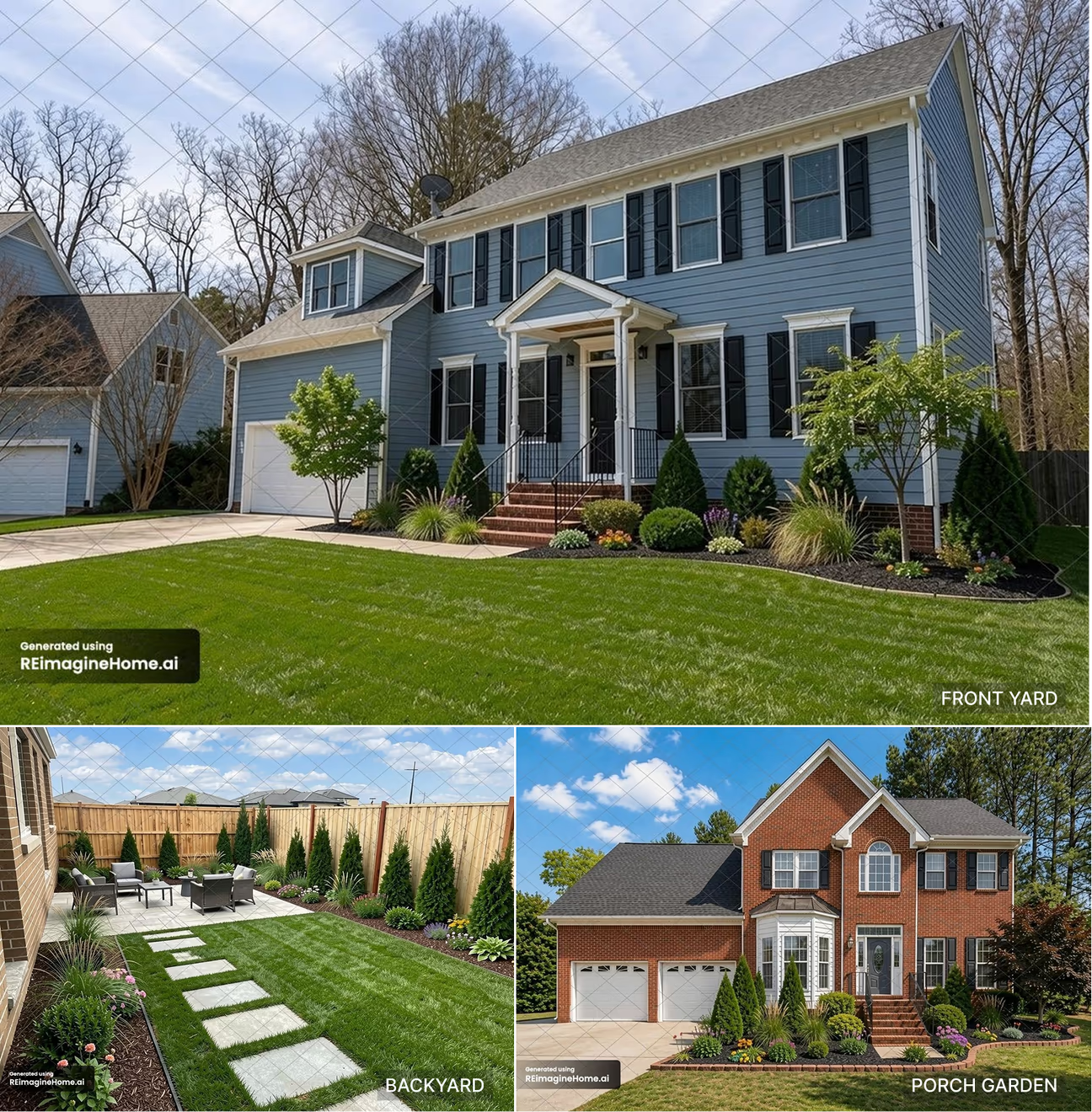
OVERALL SCORE: 6.3 / 10
Front Yard: 9.0
Backyard: 5.5
Garden: 4.5
ReimagineHome created simple and clean landscaping designs for all three spaces. It added the main requested garden features, although some areas could match the original photos more closely.
WHAT IT DID WELL:
ReimagineHome did exceptionally well in the front yard landscape design. It preserved the house architecture, driveway, walkway, and main trees in place. The app added a green lawn, shrubs, ornamental grasses, flowers, and small trees to the front yard.
In the backyard, it added a patio, outdoor seating, stepping stones, lawn, shrubs, and tall plants along the fence. It preserved the backyard dimensions. The overall look is photorealistic with clear details.
For the porch garden, it added shrubs, grasses, colorful flowers, mulch, and a brick border while keeping the brick house, driveway, steps, and surrounding trees.
WHAT COULD IMPROVE:
In the backyard, the app failed to preserve the house layout. It changed the house wall by adding two new door openings to the backyard. The stepping stones are not even in size. The app completely removed the walkway from the driveway to the house entrance. This makes the whole landscape impractical.
AVERAGE GENERATION TIME: ~20 seconds
PRICING: $19 – $119/month (credit-based)
RECOMMENDATION: Good for quickly creating simple, complete landscape ideas.
7. ArchyBase
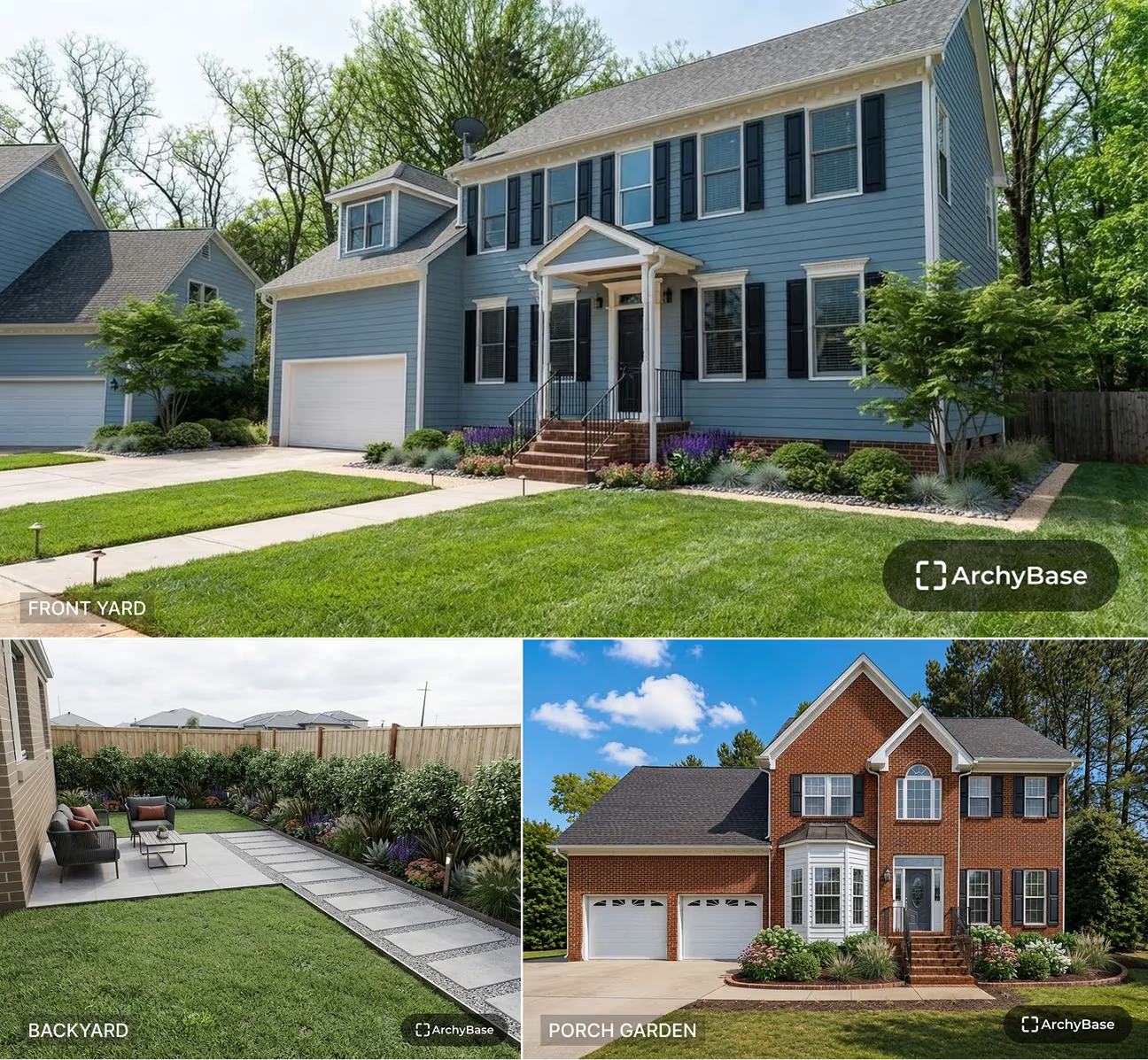
OVERALL SCORE: 5.0 / 10
Front Yard: 6.0
Backyard: 5.0
Garden: 4.0
ArchyBase created simple and natural-looking landscaping for all three spaces. It added the main garden features without making the designs look too crowded.
WHAT IT DID WELL:
ArchyBase preserved the house architecture in all three yards. In the front yard challenge, it added a small shrub garden on the right side of the garage.
In the backyard, it added a patio with movable outdoor furniture. For the porch garden, it added mulch, shrubs, flowers, and a curved brick border while keeping the house, driveway, and steps intact.
WHAT COULD IMPROVE:
It added a hardscape feature that wasn't present in the original yard, which would involve a high cost if implemented. It makes the lawn less usable for entertainment activities. The app chose a similar landscaping idea by separating the lawn into two parts. This is not practical for a small backyard like that. For the porch garden, the ArchyBase app did not add any plants on the narrow bed by the walkway. This left the landscape design incomplete.
AVERAGE GENERATION TIME: ~45 seconds
PRICING: $19.99 - $89.99/month (fixed number of designs)
RECOMMENDATION: Can be used for simple landscaping ideas for DIY projects.
8. Ideal House
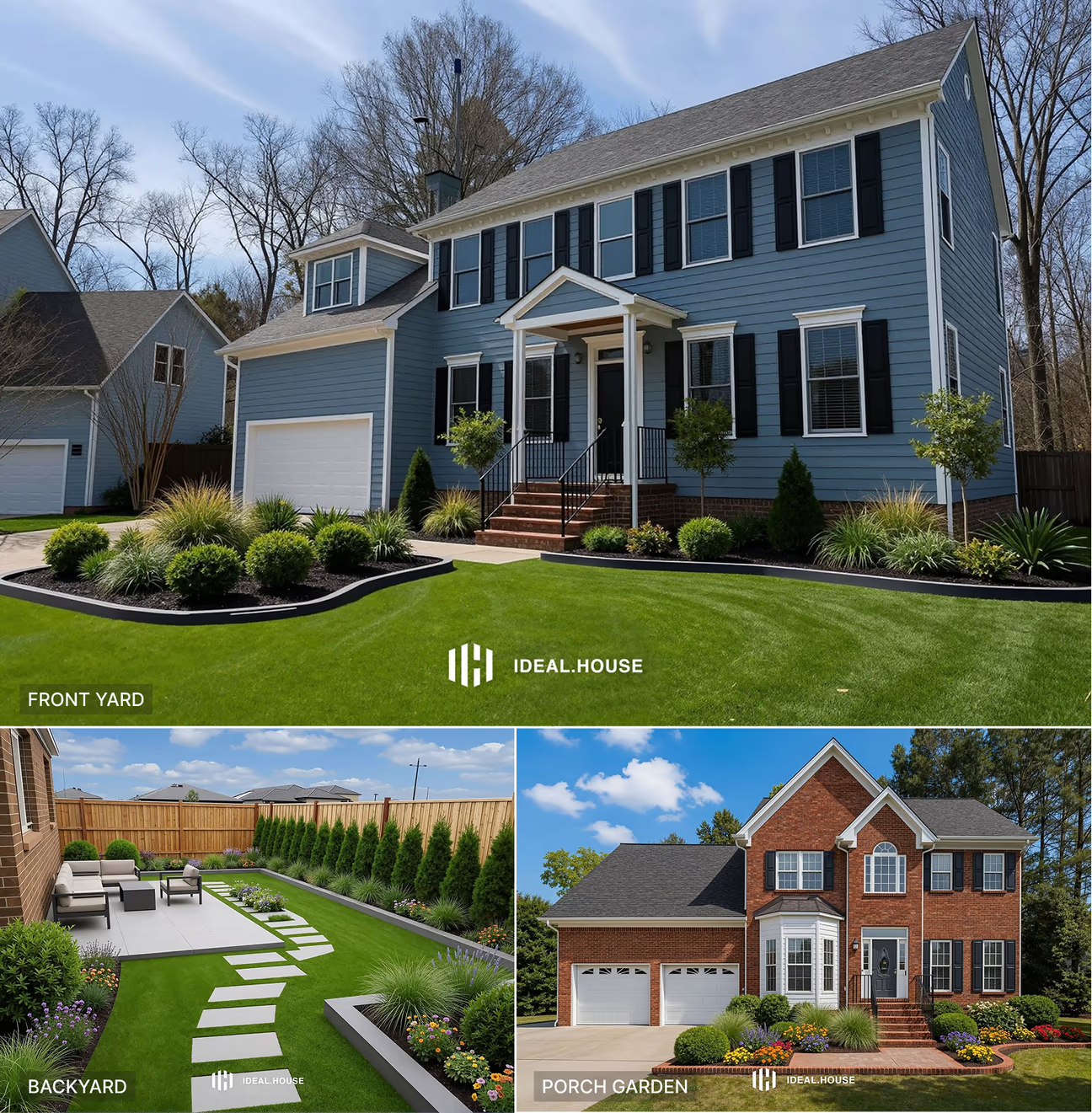
OVERALL SCORE: 4.5 / 10
Front Yard: 5.0
Backyard: 4.5
Garden: 4.0
Ideal House generated the yards in moderate quality. It followed the instructions in most cases, but failed in some crucial areas.
WHAT IT DID WELL:
The green lawn and the plants in the front yard landscape design look nearly realistic. It added shadows under the plants accordingly.
In the backyard landscaping challenge, it added a patio, seating area, lawn, stepping-stone path, and plants along the fence. It placed blooming flower plants on the garden beds.
The front porch garden complements the overall appeal of the front yard. It preserved the house features, lawn grass, and the surrounding trees.
WHAT COULD IMPROVE:
The app placed a flower bed on the lawn area near the driveway. This made the lawn area smaller. The backyard garden looks overcrowded with too many plants and shrubs. Maintaining that many plants would be expensive. The patio is too large for a small backyard like this. The stepping stones are uneven in size, and they take up so much lawn space. In the porch garden challenge, the app blocked the walkway to the driveway with plants. This made the garden impractical.
AVERAGE GENERATION TIME: ~40 seconds
PRICING: $19 - $99/month (credit-based)
RECOMMENDATION: Ideal House is suitable for users who are looking for garden or plant suggestions for their yards
App Features and Customization Options
Beyond design quality, the number of styles, seasonal options, and outdoor spaces each app supports can influence which tool fits your project best. Here's what each app offers:
| App | Landscape Styles | Seasonal Mode | Outdoor Spaces |
|---|---|---|---|
| DecorAI | 54 | 4 | 11 |
| Dehome | 6 | No | Not Specified |
| mnml | 9 | No | Not Specified |
| Home Design AI | 12 | No | 9 |
| Spacely AI | 8 | No | Not Specified |
| ReimagineHome | Not Specified | No | Not Specified |
| ArchyBase | 35+ | No | Not Specified |
| Ideal House | 25 | No | 8 |
Which AI Landscape Design App Preserves Existing Layout Best?
Layout preservation is one of the most important factors in judging any AI landscape design app. It's a major reason DecorAI stands out as the best AI landscape design app for real planning use. Homeowners and professionals need a visual reference they can hand to a landscaper. That only works if the existing structure stays accurate. Here are the three apps that did the best job keeping the original layout intact.
- DecorAI leads on layout preservation across all three tests. It kept the house, driveway, walkway, fence, and existing mature trees untouched in the front yard, and held the fence line and house shape intact in the backyard. It preserved the porch, walkway, driveway, and lawn boundaries in the garden test. None of the three results altered the property's structure or dimensions.
- Dehome held up well across the front yard and backyard tests, preserving the house architecture, driveway, and fence line in both. It scores slightly lower because it replaced the original garden bed shape with a curved layout that extended further into the lawn.
- Home Design AI consistently preserved the house architecture and overall front yard layout. It preserved the property structure in the porch garden test as well. It loses some points here because the backyard came out longer than the reference photo.
Here's an overview of which apps changed features of the reference that were instructed to preserve:
| Tool | Changed Yard Dimension | Changed House Layout or Feature | Invented Structure |
|---|---|---|---|
| DecorAI | No | No | No |
| ReimagineHome | No | Yes | Yes |
| Dehome | No | No | Yes |
| Home Design AI | Yes | No | Yes |
| mnml | No | Yes | No |
| Ideal House | Yes | No | Yes |
| ArchyBase | Yes | No | Yes |
| Spacely AI | Yes | Yes | No |
What are the limitations of AI landscape design tools?
AI landscape design apps are visualization tools, not engineering or planning tools. As our tests showed, even the top-scoring apps occasionally altered house dimensions, added structures that weren't requested, or invented architectural details that didn't exist in the original photo. These tools are built to generate a realistic idea of what a space could look like, not a document you can build from. Once you find a design direction you like, the next step should always involve a landscaper, contractor, or designer who can turn that visual concept into an actual, buildable plan. If you need more advanced planning features, our guide to landscape design software covers options built for that.
AI landscape design tools cannot reliably produce:
- Construction drawings
- Drainage plans
- Grading
- Irrigation layouts
- Permit compliance
- Plant hardiness
- Exact measurements
Frequently asked questions
DecorAI is the best AI landscape design app. It generates landscaping ideas for front yard, backyard, garden, and other outdoor spaces.
DecorAI offers a free trial for AI landscape design. You can generate 3 full-quality landscape designs with a 1-day free trial.
Yes, top AI landscape design apps like DecorAI keep your backyard layout while generating patio, lawn, seating, garden beds, plants, etc.
Yes, AI landscape design apps can help professionals like landscapers, designers, and real estate agents quickly generate visual concepts to share with clients.
DecorAI is the easiest AI landscape design app. It has a dedicated interface for landscape design with simple steps to follow to generate high-quality redesigns. No design skills are needed.
Final Words
Testing all 8 apps under the same conditions made it clear that not every AI landscape design tool delivers on its promise. DecorAI came out on top for its realistic results and consistent preservation of existing structures, making it a strong pick for both homeowners and professionals. Apps like Dehome, mnml, and Home Design AI also performed well and are worth considering depending on your budget, workflow, and design goals. Whichever tool you choose, treat the output as a starting point for inspiration rather than a final plan. Then bring in a landscaper or contractor to handle the measurements, permits, and construction details before any work begins.