If you are planning a kitchen redesign, you have probably searched for "best AI kitchen design tool" and found a dozen options claiming to be the best. Most of them show the same kind of glossy, staged photos. The only way to find out which one is really the best is to test them on the same photo.
We did exactly that.
We took one real kitchen photo and redesigned it using 8 top AI kitchen design tools. We evaluated each result and checked which tools actually preserved the original layout and which ones made materials look real. We also checked for style options, controls, pricing, and limitations. Our test results show which tools are better at marketing than at output.
This comparison is for anyone who wants a straight answer before trying another tool. If you are a homeowner choosing cabinet colors or planning a full renovation, a designer who needs quick visuals for a client, or an Airbnb host trying to make a listing look better, you will find a tool here that fits.
No sponsored placements and no guessing. Just a real test, one real photo, and a ranking based on the results.
DecorAI is the best AI kitchen design tool in 2026. In our test, it generated the most realistic kitchen redesign, kept the layout accurate, and offered the most kitchen-specific controls of any tool we tried.
Here's the quick breakdown:
- Best overall: DecorAI
- Best for generating a design from a photo: DecorAI
- Best for quick inspiration: VisualizeAI
- Best for professionals: Spacely AI
- Best free AI kitchen design tool: DecorAI (3 full-quality designs, no watermark)
We tested all 8 tools using the same kitchen photo and the same "Modern" style, so every result below is a fair, side-by-side comparison. Keep reading for the full breakdown, real outputs, and pricing for each tool.
How We Tested and Rated 8 AI Kitchen Design Tools
We wanted real answers, not fake claims, not another list of "best AI kitchen design tool" with no proof behind it. So here's exactly what we did.
We chose an existing kitchen so we could see how well each tool handles a real-world redesign. We uploaded the same photo to every tool and redesigned the kitchen interior with each tool's available settings.
We looked at more than just "does it look nice?" We judged each tool on five simple questions:
- Does the result look real?
- Did it preserve the layout?
- Does the style match what it promised?
- How much control does it give you?
- Does the result justify its price?
We built DecorAI and included it in this comparison.
We picked the top 8 tools with free trials.
Every tool was tested on the same photo with the same style.
We evaluated both strengths and weaknesses.
We ran this test in August 2026.
Quick Comparison: 8 AI Kitchen Design Tools
Here's a side-by-side look at all 8 tools, so you can quickly see which is the best AI kitchen design tool for your budget and needs.
| Tool | Kitchen Style | Kitchen Control | Preserves Layout | Speed | Price | Subscription Type | Score |
|---|---|---|---|---|---|---|---|
| DecorAI | 10 | Yes | Yes | ~30s | $24/month | Unlimited Design | 9.3 |
| Spacely AI | None, Prompt only | No | Yes | ~50s | $25 - $100/month | Credit-based | 7.5 |
| ReimagineHome | None, Prompt only | No | Yes | ~25s | $19 - $119/month | Credit-based | 6.7 |
| VisualizeAI | 16 | No | Yes | ~15s | $17 - $21/month | Credit-based | 6.5 |
| Dehome | 16 | No | No | ~45s | $9.99 - $399/credit pack | Credit-based | 6.2 |
| RemodelAI | 27 | No | No | ~15s | $10/week | Unlimited Design | 5.5 |
| RoomGPT | 9 | No | No | ~15s | $9 - $29/month | Credit-based | 4.5 |
| Home Design AI | 24 | No | No | ~1m 20s | $19.99- $99.99/month | Credit-based | 4.0 |
One Kitchen Photo to Test All 8 Tools
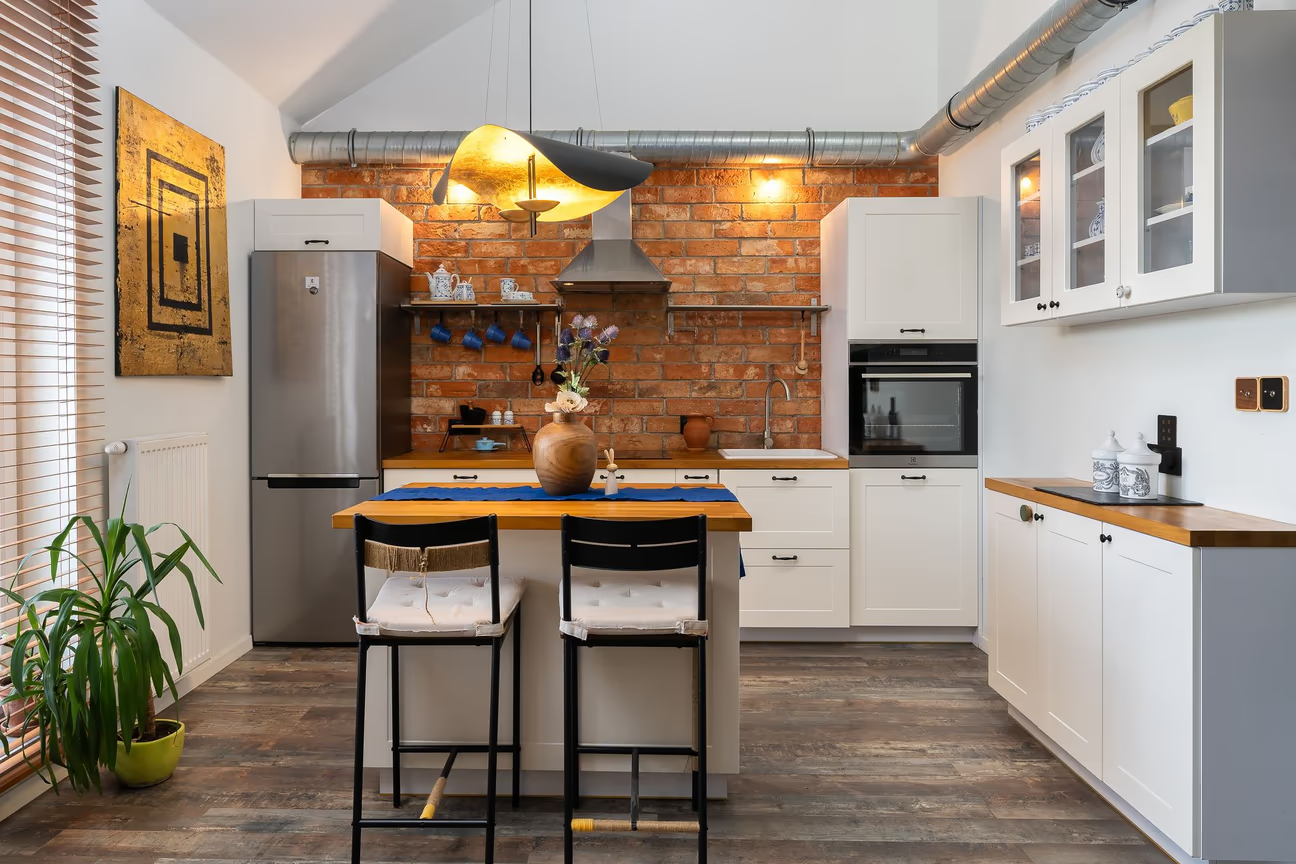
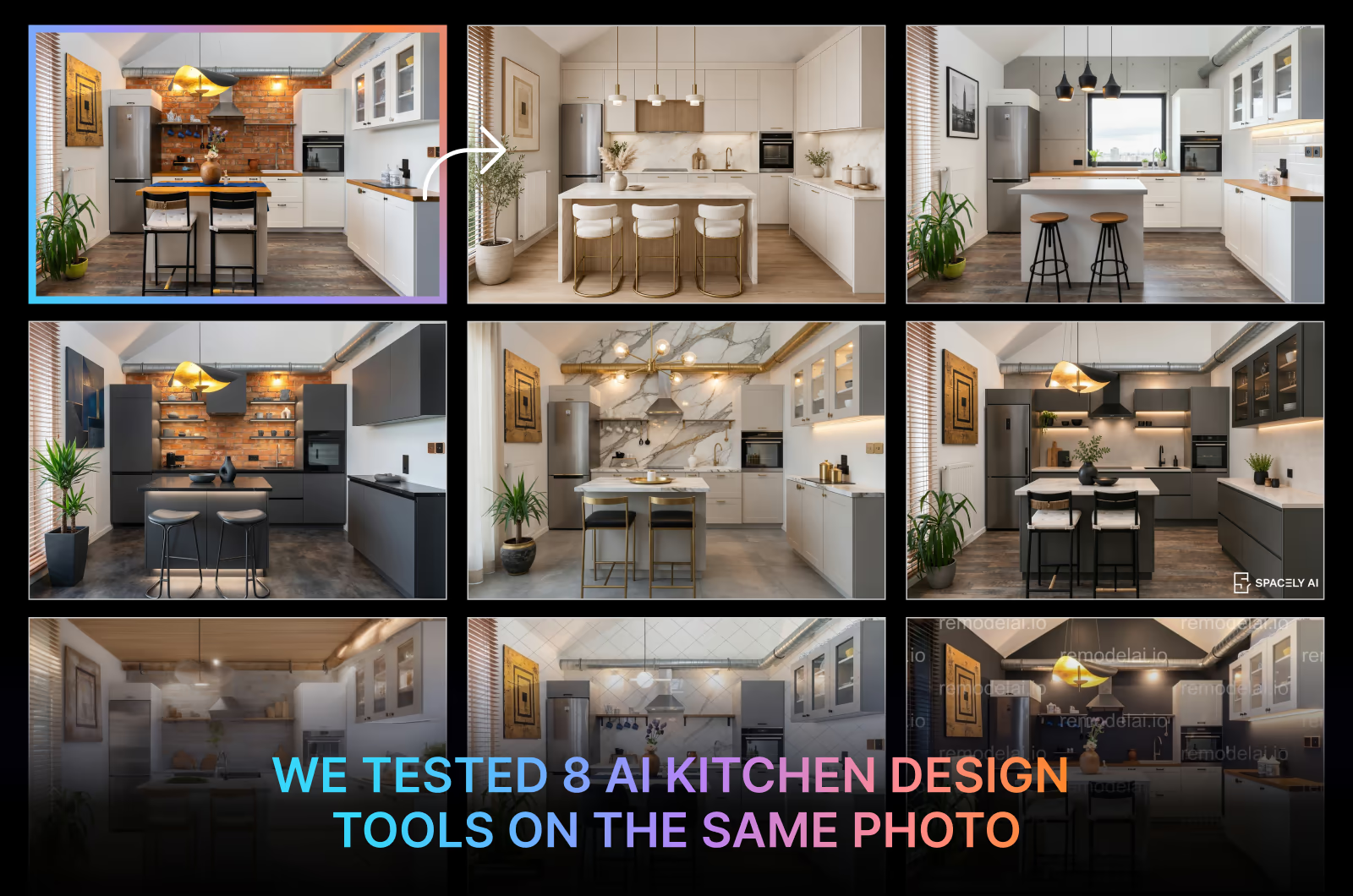
We used this exact photo of a contemporary kitchen for all 8 tools. The challenges in redesigning this kitchen included maintaining the overall layout, keeping the awkward ceiling dimension, and preserving the window, appliances, and their positions. While testing, we selected the style 'Modern' for every tool to keep the comparison fair. Now see how each tool redesigned the kitchen with the same style selection.
The Same Kitchen Photo Tested With 8 AI Design Tools
1. DecorAI

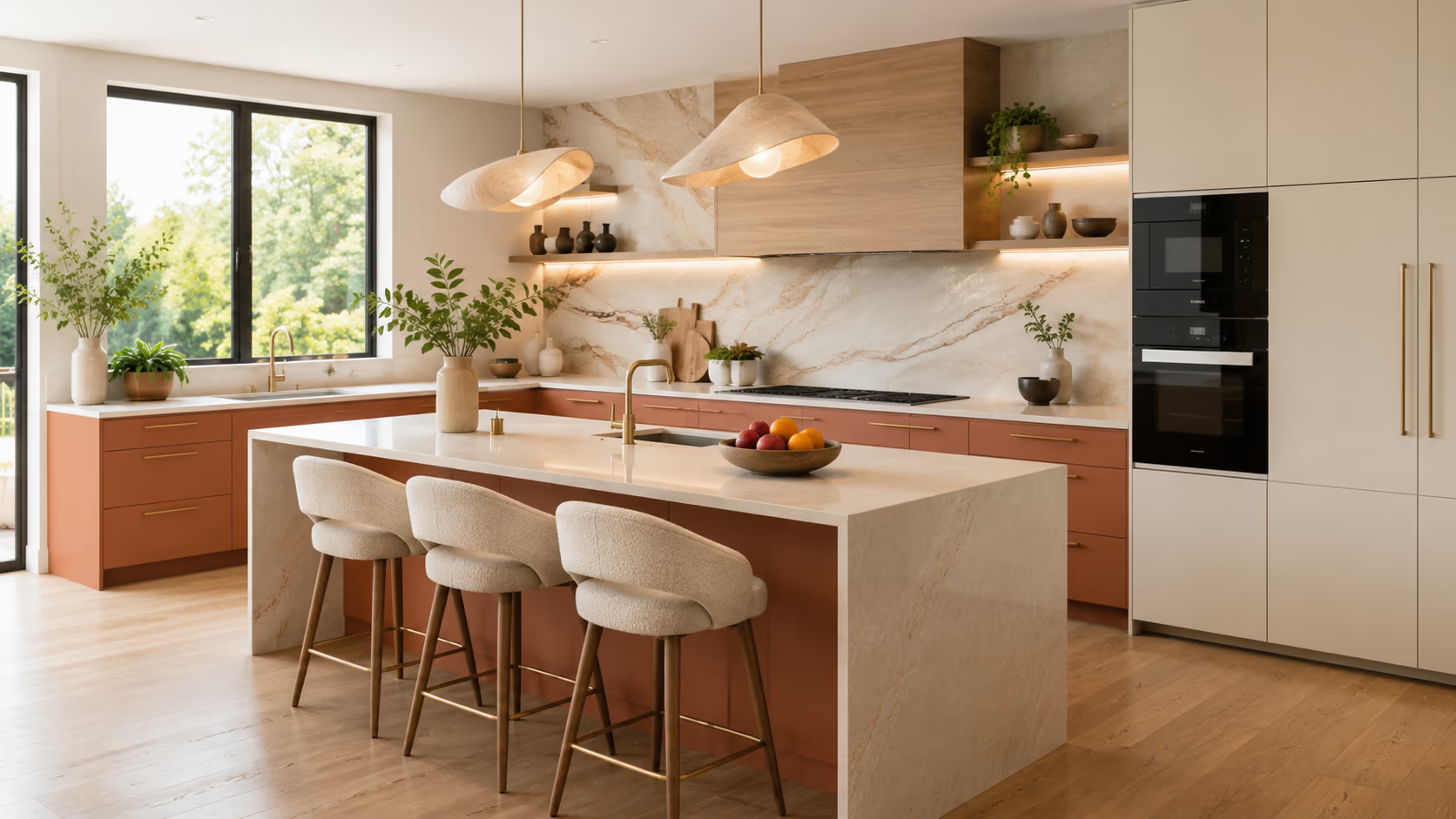
With a score of 9.3, DecorAI is the best AI kitchen design tool in 2026. The DecorAI kitchen redesign tool generated the most realistic result, with accurate layout and material finishes. It upgraded the kitchen interior without affecting the original appliance setup.
DecorAI is the only AI interior design app that has a dedicated tool for kitchen redesign. It comes with three generation modes. The simple mode includes 7 kitchen types, 10 styles, and 15 cabinet color options, making it easy for beginners to create quick redesigns. The Pro mode adds more control over cabinet and island sizes, seating customization, countertops, flooring, appliance finishes, and lighting. This mode has 7 cabinet styles to choose from. The third mode, "describe with text," lets you instruct the AI in your own words. You can generate up to 4 variations at a time in under 30 seconds. DecorAI costs $24 per month and includes unlimited AI designs, plus a 1-day free trial offering 3 full-quality, watermark-free designs.
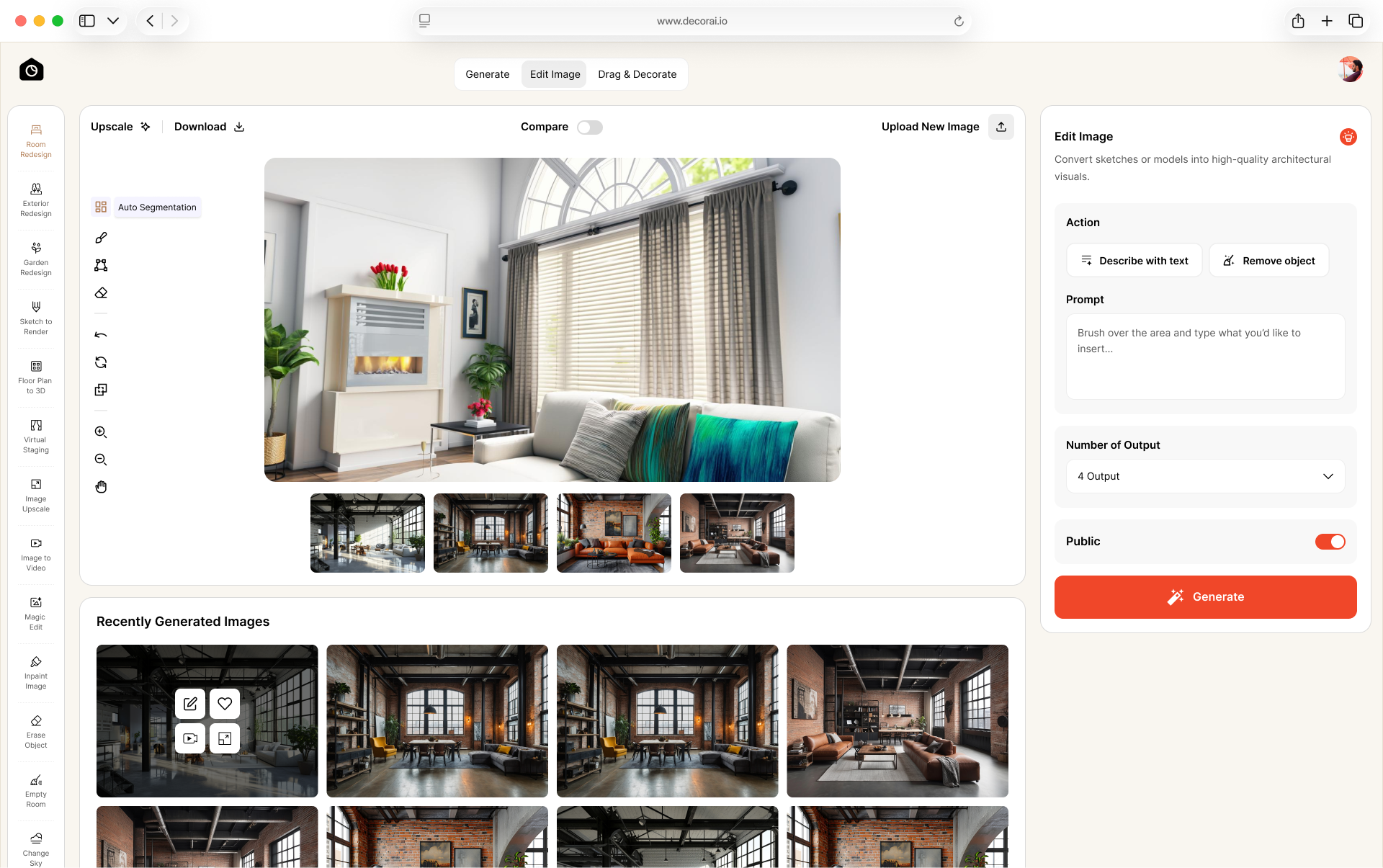
The DecorAI dashboard includes post-production tools like Magic Edit, Inpaint Image, and Surface Editor for adjusting specific parts of your design, a Relight tool for lighting, Style Swap with 40 additional styles, and Image to Video to turn your redesign into a video.
SCORE: 9.3
WHAT IT DID WELL: DecorAI generated a photorealistic redesign with clear details. It completely replaced the rusty-looking brick backsplash. It preserved the room layout accurately. It cleverly used covered cabinets to hide the kitchen exhaust duct, making it the only tool in our test to do so. It used modern materials and finishes throughout the kitchen. This AI kitchen design tool widened the island and added extra seating, making the kitchen more functional. It kept the existing kitchen appliances perfectly in their original places. It also replaced the indoor plant with one that matched the overall look. The result feels like a finished, list-ready kitchen rather than a random, unrealistic AI redesign.
WHAT COULD IMPROVE: The tool could have added more contrast. The artwork could have looked more realistic instead of abstract.
PRICING: $24/month (unlimited designs)
RECOMMENDED FOR: Homeowners, renters, and Airbnb hosts who want to visualize a kitchen makeover from their existing photo, and interior designers who need quick, photorealistic visuals for client projects.
2. Spacely AI
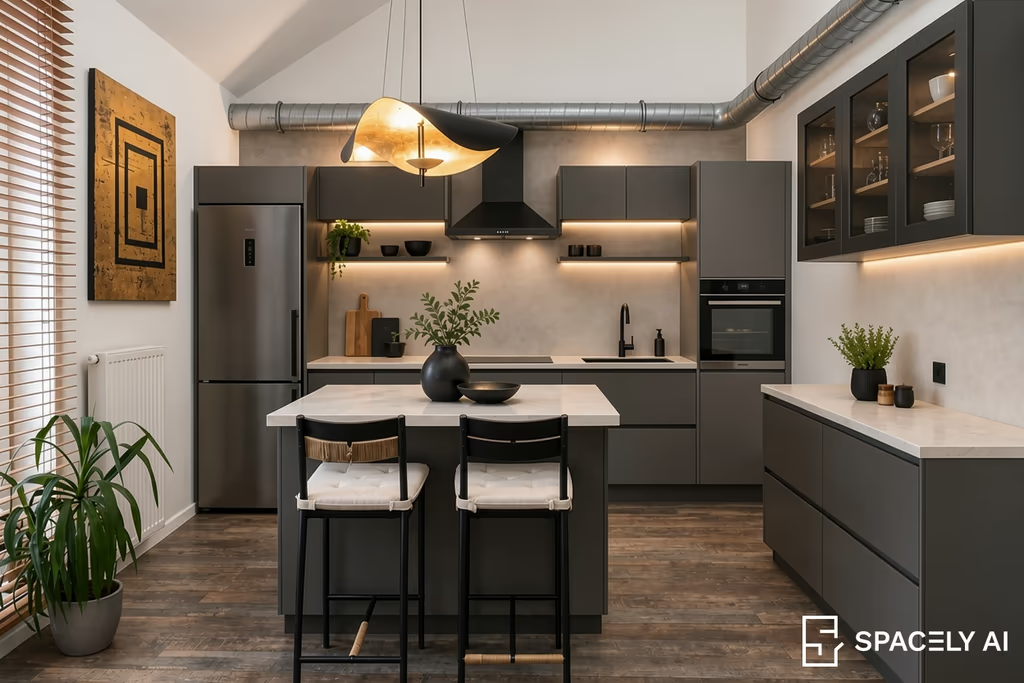
Spacely AI is one of the top contenders for the best AI kitchen design tool for professionals, with 3D software integration options. We used its Auto Edit tool to redesign the kitchen since it does not have a dedicated tool for kitchen redesign.
The tool opens with an infinite canvas featuring only a prompt for redesigning an interior photo. We instructed it to transform the kitchen into a modern-style kitchen without affecting the original room layout. It generated a modern look for the kitchen with dark cabinetry and under-cabinet lighting. The overall output is pretty good, and it preserved the room layout accurately.
SCORE: 7.5
WHAT IT DID WELL: Spacely AI created a realistic modern kitchen with strong material and lighting choices. It used dark cabinetry, a stone countertop, and under-cabinet lighting to create a convincing contemporary look. It preserved several important elements from the reference, including the window, wall, and ceiling. It kept the refrigerator, oven, and sink in their original positions. The overall room proportions remained almost the same.
WHAT COULD IMPROVE: Spacely AI was unable to integrate or hide the kitchen exhaust duct. This makes the redesigned kitchen feel less finished. Concealing the duct was one of the requirements of this kitchen redesign challenge. It could have used a different pendant light above the island. The island seating stayed the same.
PRICING: $25 - $100/month (credit-based plans)
RECOMMENDED FOR: Professional interior designers, architects, and real estate professionals for larger projects.
3. ReimagineHome
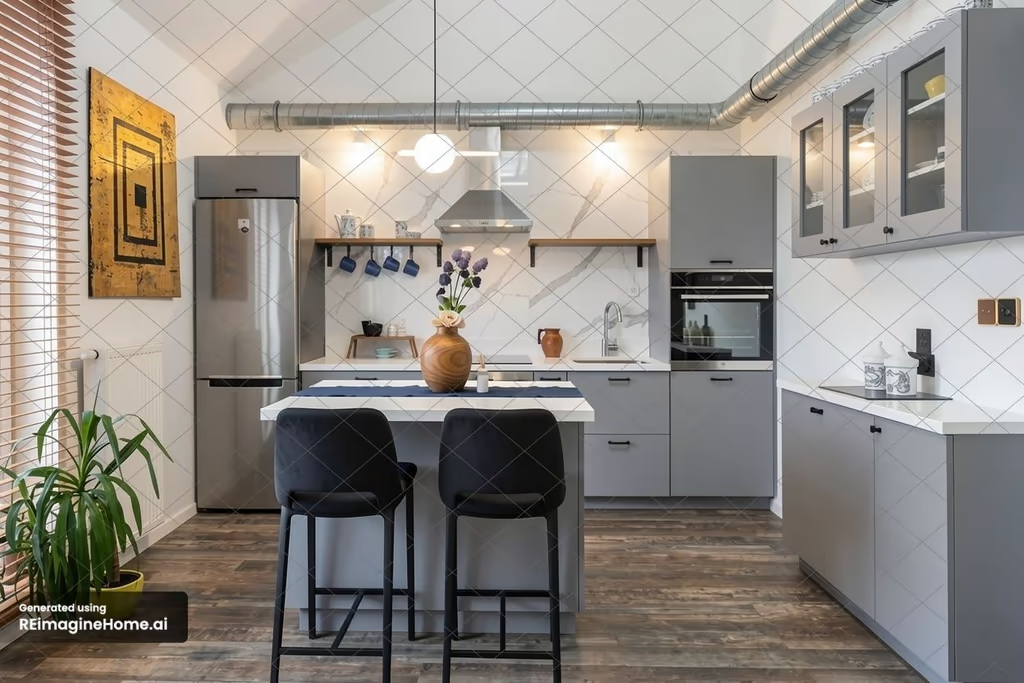
ReimagineHome is a strong option among the best AI kitchen design tools if you want to stage real products you can purchase. This tool uses a simple chat interface that has a guided workflow. After uploading a photo, the interface helps generate redesigns with guided selections. We selected the "Suggest listing-ready ideas" option and prompted it to generate the kitchen in modern style. It took about 25 seconds to generate the result above.
SCORE: 6.7
WHAT IT DID WELL: ReimagineHome did a good job of keeping the overall kitchen layout recognizable. The refrigerator, oven, sink, island, right-side cabinetry, window, blinds, and flooring remain close to the reference. The marble backsplash gives the kitchen a fresh, upscale look. It replaced the pendant light with a brighter one.
WHAT COULD IMPROVE: ReimagineHome also failed to hide the kitchen exhaust duct. Like Spacely AI, ReimagineHome left the exposed duct running across the upper wall and ceiling, instead of finding a way to conceal it. The replaced lights over the backsplash look too bright for the cooking zone. The free trial adds a watermark to the generated images, which can make the final results unusable.
PRICING: $19 - $119/month (credit-based)
RECOMMENDED FOR: People who want to stage their interiors with real products that they can purchase.
4. VisualizeAI

VisualizeAI has a simple workflow. You can simply upload a photo, choose a style, and generate a redesign. It does not have a dedicated tool for kitchen design. The tool interface is clean. After uploading the kitchen photo, we selected the Modern Luxe style, then selected the room type as Kitchen and generated the result. It generated the result very fast. The introduction of brass finishes looks good in the kitchen materials. The tool has a feature called "Try It In My Room" that allows uploading furniture or appliance photos to stage in a room. The result was surprisingly good for a relatively new tool.
SCORE: 6.5
WHAT IT DID WELL: VisualizeAI created a polished and realistic kitchen with a strong upscale look. It preserved the key elements of the kitchen, including the refrigerator, oven, sink, and island. It kept the overall room proportions. It consistently applied brass finishes to the seating, tap, handles, plant tub, and other accessories. It replaced the pendant light with a new one that complements the overall modern look.
WHAT COULD IMPROVE: The biggest issue is the kitchen exhaust duct. Instead of hiding it, the tool changes it to a brass finish, making the duct an even more noticeable feature. The marble backsplash was extended all the way to the ceiling, which looks awkward.
PRICING: $17 - $21/month (credit-based)
RECOMMENDED FOR: Homeowners and renters for quick style exploration for interior and exterior spaces.
5. Dehome
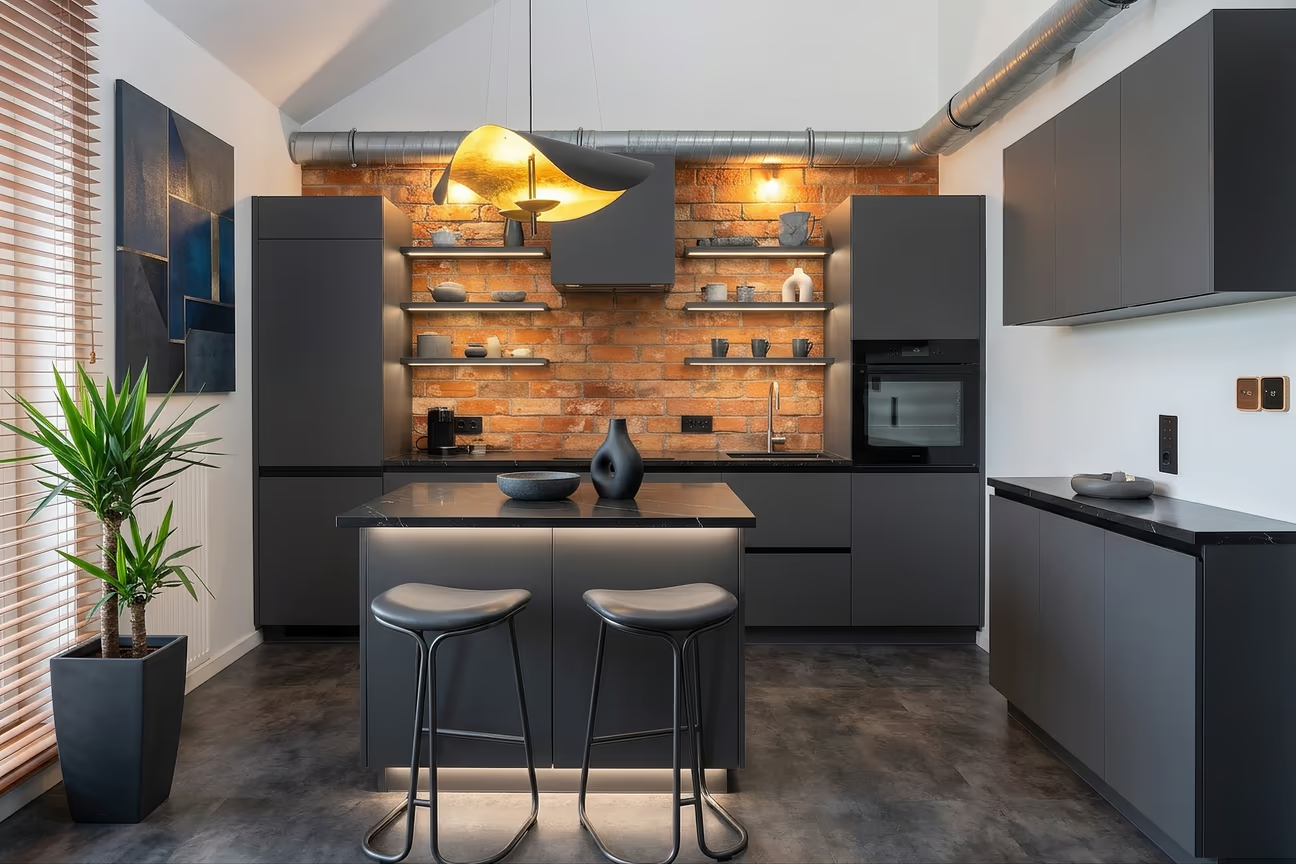
Dehome generated a bold industrial look for the kitchen. It used dark cabinetry and surfaces. The Dehome app interface is easy to use. The Room Type and Design Style lists have a visual guide. This gives you a preview of how your kitchen may look. The lighting mode and brightness controls make it easy to test different moods.
Although Dehome does not have a dedicated tool for kitchen redesign, the available controls are enough for casual users.
SCORE: 6.2
WHAT IT DID WELL: Dehome preserved most of the features, including the exposed brick backsplash, window and blinds, oven location, sink area, island placement, and overall room proportions. The dark cabinetry, seating, and black countertops with accent lighting created a consistent industrial-modern look. It replaced the plant with a large black tub that matches the overall look.
WHAT COULD IMPROVE: The Dehome AI kitchen design tool also failed to hide the kitchen exhaust duct. It replaced the refrigerator with a vertical cabinet. That's a significant flaw. The dark flooring makes the kitchen feel darker and smaller.
PRICING: $9.99 - $399/credit pack (credit-based)
RECOMMENDED FOR: Homeowners for quick redesigns, and interior designers and architects for detailed 2D and 3D floor plans.
6. RemodelAI
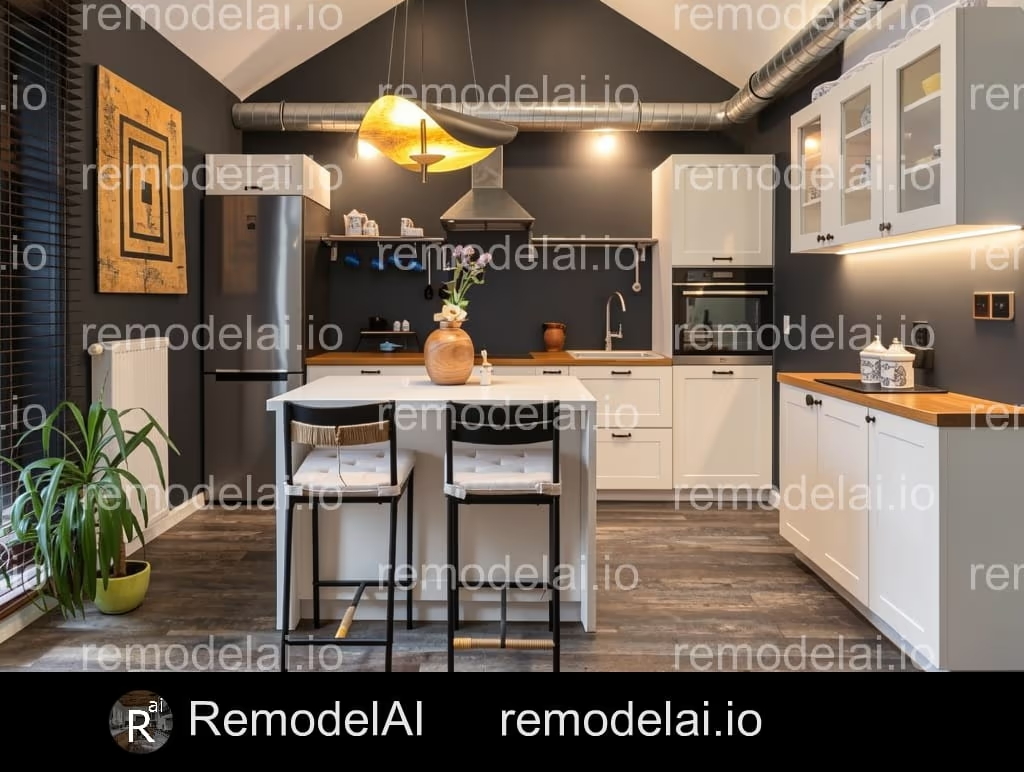
RemodelAI currently has only a mobile app for interior and exterior redesign. It comes with weekly and annual plans along with a free trial. The kitchen redesign option is available inside the Interior Redesign tool. The workflow is simple: upload or capture a photo, select the room type, select an AI intervention level, write a prompt, then select a style to generate. We followed the same process to redesign the kitchen. Here's our evaluation of the generated result:
SCORE: 5.5
WHAT IT DID WELL: RemodelAI kept the refrigerator, oven, sink, island, right-side cabinetry, window, and flooring close to the reference. The combination of dark walls, white cabinetry, and warm wood countertops created a strong visual contrast. The final image remains reasonably realistic.
WHAT COULD IMPROVE: RemodelAI failed to preserve the entire room layout. It changed the layout of the right part of the ceiling and left the kitchen exhaust duct exposed. It extended the dark backsplash up to the ceiling, which made the room look even darker. The heavy watermarking on the free tier makes the image unusable for any purpose.
PRICING: $10/week (unlimited designs)
RECOMMENDED FOR: Casual users for quick interior design idea generation.
7. RoomGPT
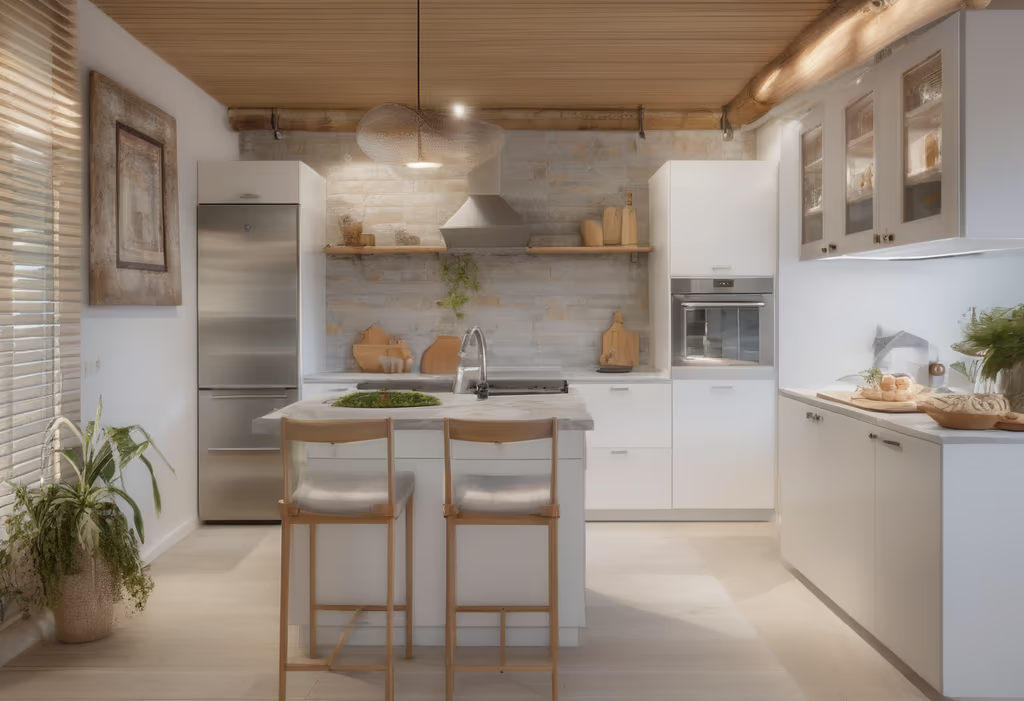
RoomGPT generated the blurriest output among the 8 tools we tested. The generation speed is very fast, but the result quality is nowhere near any other tool's result. The user interface is very simple: upload your room photo, select a room type, write an optional detail, select up to 4 themes, then generate. After uploading the reference kitchen photo, we selected the kitchen room as the room type and selected the modern theme, and it generated the output above.
SCORE: 4.5
WHAT IT DID WELL: RoomGPT kept the cabinetry, island, seating, refrigerator, and oven in their original positions. The tool gave the cabinets a flat finish. The backsplash looks clean and polished. It replaced the plant with a new one on a different tub and gave the seating a wooden structure.
WHAT COULD IMPROVE: RoomGPT clearly failed to keep the room layout. It invented a wooden ceiling in the room. The kitchen sink has vanished. A stray water tap was placed on the island. The refrigerator design was changed. The overall image is glossy, blurry, and unrealistic.
PRICING: $9 - $29/month (credit-based)
RECOMMENDED FOR: Casual users who don't require photorealistic redesigns.
8. Home Design AI
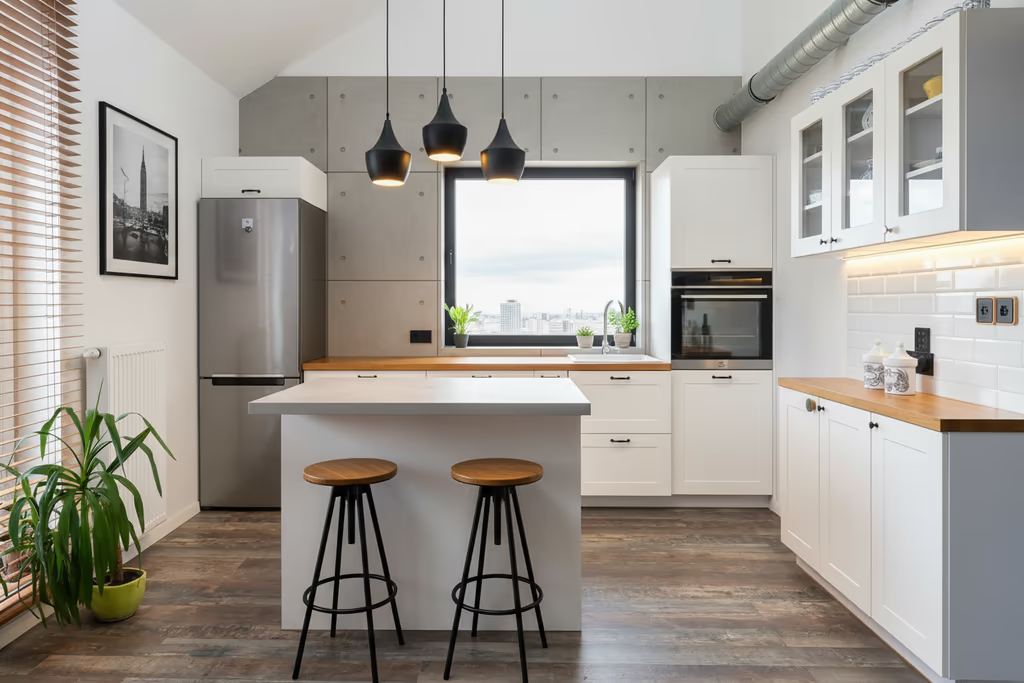
Home Design AI introduced a major layout error by replacing the backsplash and kitchen hood with a window. It removed the stove as well. These changes made the generated kitchen look unrealistic.
The app interface is clean and easy to navigate. We had to select the room type first, then upload our reference kitchen photo, select the modern style, and then generate the result. The image generation was the slowest among the 8 tools.
SCORE: 4.0
WHAT IT DID WELL: Home Design AI generated a clean and modern look. It changed the seating style to tall metal stools. It introduced modern pendant lights above the island. The refrigerator, sink, and oven are in their original places. Home Design AI replaced the painting on the left wall with a black-and-white photo. The overall image is polished and visually appealing.
WHAT COULD IMPROVE: The tool made major changes to the original kitchen layout and architecture. Most notably, it added a large window to the back wall where the original kitchen has an exposed brick wall. It also removed the stove and the kitchen hood. All these changes made the kitchen impractical and non-functional. The render time was very slow; it took around 1 minute and 20 seconds to generate the result.
PRICING: $19.99 - $99.99/month (credit-based)
RECOMMENDED FOR: Curious users to see what the tool creates.
Best AI Kitchen Design Tool for Different Needs
Each AI kitchen design tool comes with different special features. Some are ahead in style count, some are stronger in kitchen controls, and some set themselves apart with high-quality renders. Here are our recommendations for the best AI kitchen design tools for different needs:
Best Overall AI Kitchen Design Tool
DecorAI is the best AI kitchen design tool overall. It is the only AI kitchen design tool that has a dedicated interface and control setup. Homeowners can use this tool to visualize a complete renovation or explore specific customizations. Renters can stage new appliances or temporary styling ideas without changing the kitchen layout. Interior designers and real estate professionals can generate hundreds of kitchen ideas in a single session with pro controls. With post-production tools, you can make targeted adjustments to your design. You can upscale the result for listing, printing, or presentation.
Best AI Tool to Generate a Kitchen Design from a Photo
DecorAI takes the top spot as the best AI interior design tool for generating a kitchen design from a photo. It supports photos in JPEG, PNG, WEBP, and HEIC formats. You can upload your kitchen photo from your device or via a link to the photo. Once you upload it, the AI automatically detects the room's layout, including where your cabinets, counters, and appliances are located, so the finished design lines up with your actual kitchen. You can generate as many designs as you like from the same photo, without having to upload it again each time.
Best Tool for Quick Inspiration
VisualizeAI can be a good choice for quick inspiration. With minimal setup, this tool can generate redesign ideas very fast. If you are looking to try basic styles without advanced controls, VisualizeAI can be your go-to tool. Using its Try It In My Room feature, you can stage any kitchen appliances or furniture photo in your actual kitchen setup.
Best Tool for Professionals
For professionals, Spacely AI is an obvious choice. The integration of 3D software and the pro-friendly interface makes it the best tool for professionals. The Spacely AI studio canvas has collaborative features. Multiple team members can collaborate on the same project in real time. You can create proposals and present them to your clients directly from the canvas.
Best Free AI Kitchen Design Tool
DecorAI is the best free AI kitchen design tool. You can try this dedicated kitchen design tool with a 1-day trial and generate 3 free designs. The free designs are full quality, the same as the paid plans' output. You can use all the pro tools in the free trial. The results are watermark-free with commercial usage rights.
AI Kitchen Design Tools vs Human Designers
Even the best AI kitchen design tool can't do everything a human kitchen designer does. Here's how they compare:
| Feature | AI Kitchen Design Tools | Human Designers |
|---|---|---|
| First design | In 30 seconds | Days to weeks |
| Visualize your real kitchen | Yes, from a photo | Yes, as a paid render |
| Explore many styles | Unlimited, no extra cost | Limited by billed hours |
| Stage furniture and decor | Yes, digitally | Yes, digitally and in person |
| Cost | $24 a month | Per project, quoted |
| Availability / Turnaround | Instant | Needs scheduling |
| Construction drawings | No | Yes |
| Plumbing and electrical planning | No | Yes |
| Measure space accurately | No | Yes |
| Final build decisions | No | Yes |
What AI Kitchen Design Tools Still Cannot Do
AI kitchen design tools are great for quick ideas. But they have real limits, and it helps to know them before you get too attached to a design.
- They can't give you exact measurements
AI tools work from a photo, not a blueprint. They can show you what a style might look like, but they can't tell you the exact width of your counter or how much space you have for a new island. For real numbers, you still need to measure your kitchen yourself or bring in a professional. - They can't create construction-ready plans
A design you generate with AI is a visual, not a set of plans a contractor can build from. It won't include the technical details builders need, like framing, cabinet dimensions, or structural changes. - They can't handle electrical or plumbing drawings
Moving a sink or adding an island often means moving pipes and wiring too. AI tools don't know where your plumbing or electrical lines actually run, so they can't plan around them. That part still needs an electrician or plumber. - They can't get your design approved by code
Every city has building codes for kitchens, covering things like ventilation, outlet placement, and clearances. AI tools have no idea what your local codes require. Only a licensed professional can confirm your design is up to code. - They can't replace a contractor
AI tools are great for figuring out the look you want. But turning that look into a real, working kitchen still takes a licensed contractor. They handle the labor, the materials, the permits, and everything that has to go right for the design to actually hold up.
The best way to use AI kitchen design tools is early in the process. Use AI to explore styles and narrow down what you like. Then bring your favorite designs to a contractor or kitchen designer to figure out what's actually possible in your space.
Frequently asked questions
Yes, AI can design a new kitchen for you from a photo of an empty room or an existing kitchen photo. The best AI kitchen design tools keep your room layout and place appliances according to existing plumbing.
Yes, ChatGPT can design your kitchen. But only with prompts and a reference image. You will not have selectable controls and presets like AI kitchen design tools such as DecorAI.
Not all AI kitchen design tools are accurate. Only a few tools can preserve your layout, appliance placement, and room proportions.
Yes, DecorAI can render your kitchen sketch into a photorealistic redesign with real appliances and materials.
No, most AI kitchen design tools are easy to use. You don't need any design experience to generate kitchen design ideas with these tools.
Yes, contractors regularly use AI-generated kitchen designs as a reference point during quoting. Showing a visual of the cabinet color, countertop material, and layout style helps them understand your vision faster and give a more accurate estimate.
Final Verdict
Testing all 8 tools on the same kitchen photo made one thing clear: not every AI kitchen design tool delivers what it promises. DecorAI came out ahead in our testing as the best AI kitchen design tool overall, with the most realistic output, the most kitchen-specific controls, and a free trial that doesn't cut quality. But the right tool still depends on what you need it for. AI kitchen design tools are a starting point for ideas, not a replacement for measurements, permits, or a contractor who can turn a rendering into a real, working kitchen. Use AI to figure out the look you want, then bring that direction to a professional to make it real.